Category: Wifi

  • *UPDATE* Mis-Information Fixe(802.11)r

    It has been brought to my attention that I may have posted some incorrect information. Thanks to both Andrew von Nagy and Jason Hintersteiner for raising the question of whether or not .11r is enabled by default. After thinking more about this, I realized that this would in fact be a weird default setting. After further research and some quick labbing, I determined that I did post incorrect information. 802.11r is NOT enabled by default on PSK networks on the Cisco WLC or the Meraki dashboard. I have updated my previous post with an EDIT but left the original information posted.

    My apologies for the incorrect information.

  • Husband, Father, Wifi Fixe(802.11)r

    ****UPDATE****

    Thanks to Andrew von Nagy and Jason Hintersteiner for bringing this to my attention.  The 802.11r (FT) default setting in both the Meraki dashboard and Cisco WLC is in fact set to DISABLED.  I don’t recall changing this setting, but I must have.  My apologies.

    ***************


    At my house I have many duties.  I am husband, father, plumber, carpenter, lawn mower, wood-cutter/splitter, etc.  The list is long and I enjoy every one of them (most of the time).  I am also the CIO.  We don’t have a sophisticated ticket system for entering technology problems, but we do have a sophisticated alert system named “Ella.”  This system has been online since August 2011 and is very good at letting me know when the “wifi is not working” or the “internet is down.”  Ella is my daughter.  When Netflix comes to a screeching halt I know of the problem in very short order and there is very little tolerance for downtime.  Of course most issues that the end users experience at home (much the same at work) look like a wifi problem but a lot of times are not.  Most issues can easily be solved by cycling the power on either the WatchGuard Firewall running pfSense or the cable modem.  I have an assistant that I have trained to handle such tasks when I am not around.  His name is William and he is my nine-year old son.  He used to be a reliable network monitoring system like his sister but sports have replaced technology for the time being.

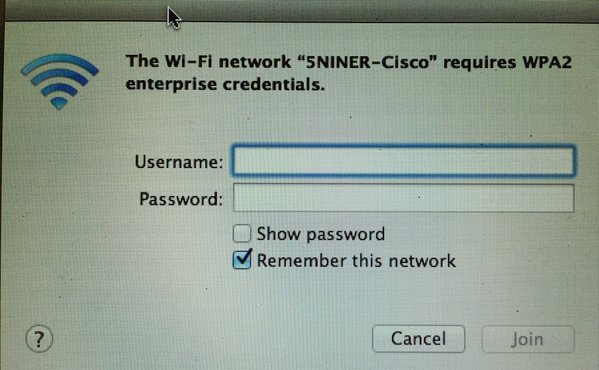
    This brings me to a recent issue that we experienced on the home front.  It WAS a wifi issue…kinda.  My wife brought me her work issued MacBook Air which would not connect and was asking for WPA2 Enterprise credentials.  Cisco8021xThe MBA was one of the first and hasn’t been updated in a very long time (OS X 10.8).  It should be noted that I offer up three different flavors of wifi at the house; Cisco, Meru, and Meraki.  Each iteration offers one SSID of which her MBA would not connect to any.  Each SSID uses the same WPA2-PSK passphrase and runs the most current version of code on the back-end.  Of course my wife made it very clear to me that “it works just fine at work” in her classroom (also Meru).  All other devices were working fine including both of our iPhones and my Dell with Intel 7260.  I mulled it over for a few minutes but could not figure out why her MBA continuously asked for WPA2 Enterprise credentials on all of my SSIDs.  A quick Google search didn’t reveal anything obvious and a station log remained empty on the Meru controller.  The only thing that stood out in my mind was that I recently updated my Meru controller and turned on all the latest bells and whistles.  She had only ever been connected to the Meru SSID so I started there.  I created a very generic SSID named affectionately “ForYourDumbMac” and configured it very similar to the others but left most settings default; all legacy rates enabled, same WPA2-PSK passphrase, etc.  The MBA connected to the new SSID on the first try!  I started flipping switches on “ForYourDumbMac” one by one until the MBA would no longer connect and I was prompted for WPA2 Enterprise credentials.  Lo and behold the last switch that was flipped before the MBA stopped working was to enable 802.11r (Fast BSS Transition).  I toggled 802.11r back off and the MBA happily connected again.  For those of you not in the know, 802.11r allows for a more speedy transition while roaming between APs.  This is of course a very basic explanation and a more detailed explanation of 802.11r can be found in this CWNP whitepaper written by Devin Akinhttps://www.cwnp.com/uploads/802-11_rsn_ft.pdf .

    Courtesy of https://supportforums.cisco.com/sites/default/files/media/802.11r_support.png
    Courtesy of https://supportforums.cisco.com/sites/default/files/media/802.11r_support.png

    Once I was able to determine that 802.11r was causing the issue I turned it off (which is the default setting) on the original Meru SSID and the MBA connected right away.  Further research turned up a chart (right) that showed 802.11r was first supported in OS X Yosemite 10.10.

    EDIT – The following sentence is incorrect.  The default setting for 802.11r is DISABLED.

    I checked both the Cisco controller and Meraki dashboard and they both had 802.11r (FT) enabled by default for PSK SSIDs but not 802.1x SSIDs.

    CiscoFT
    Cisco 2504 WLC running 8.2.100.0
    MerakiFT
    Meraki Dashboard running latest firmware as of 05/02/2016


    So I had to do the one thing that I hate to do.  I had to tailor\dumb-down the entire network (albeit my small home network) to support a single client.  But you know the saying, “happy wife…happy life.”

  • 1001 Meru-vian Nights; An Introduction

    Yup…I’m that guy.  The “I like my SCA, MCA’ed” guy.  Sometimes I feel like I am the only one that lives on the “single channel architecture” island.  It took quite some time to actually admit to my wifi peers that I used and liked Meru wireless.  I am, however, vendor neutral.  I LOVE all wifi!  More on that later…

    As this is my first venture into blogging, I guess I should introduce myself even though 90% of you who are reading this know me through the wifi community.  My name is Mitch Dickey.  I am originally from Wisconsin (the whole badger thing), but have lived in Virginia since 1993.  I started into the IT industry after I graduated from Bridgewater College (VA) in 2003.  I scored my first job with the school district that I had graduated from four years previous.  I had participated in the cooperative education program while in high school and completed an internship prior to my graduation from college with that district.  Having established many good relationships before I was hired allowed me to be blessed with a job upon my graduation.  After a few years I decided to set some goals for myself as I was getting bored turning screwdrivers and babysitting servers (no offense to those who do these critical jobs, it just wasn’t for me anymore).  I decided to get into networking but more specifically Cisco networking.  I attended classes, read, studied, purchased older equipment to lab with, and watched training videos, etc, all on my own time.  It took a couple of years (you know…just married, kids, buying a house) to get to my first goal but I attained my CCENT.  I began to search for other opportunities that would allow me to grow and achieve my next goal, becoming a Network Engineer.  I was able to find a position in 2011 that would allow me to take that next step and grow even more.  Shortly after taking a position with a VAR, I was asked what my interests where and we both decided that the wifi route would be beneficial for both of us.  I completed my CCNA and started down the wifi path.  I have always been interested in RF in general but when I was given the opportunity to take CWNA training, I fell in love.  Since that CWNA class back in 2012, I cannot get enough wifi!  Although the VAR I worked for primarily sold Meru, I tried to get my hands on as much wifi equipment as I could.  Shortly thereafter I took the CWNA exam and passed.  While working at the VAR, I was responsible for other aspects of IT so I was not able to completely focus 100% on wireless.  On my own time, again, I began studying for the CCNA-W.  I purchased some used equipment and set it up at my house.  I was able to prepare with the limited resources I had and I passed the CCNA-W exam!  I was accomplishing my goals at a very quick pace!  It was now time to start working towards my next goal; becoming a Network Engineer in an enterprise class environment.  I wasn’t really looking but an opportunity presented itself in 2014.  Not only was it at a K12 (where I loved working previously), but it was a Senior Network Engineering position at a very large K12 where I would be responsible for just the network, primarily wifi!  I was back working with a team and on the equipment I love.  Perfect!  I started with LCPS in 2014.  I completed my CWAP last year and am currently working on my CCNP-SWITCH.  I have my eyes set on the CWNE.


    A little about my day to day right now.  We currently maintain just under 100 sites with just over 5500 access points.  At peak usage during the day we typically average 48,000 wireless devices.  A recent report showed that we touched 113,000 unique devices in a 24 hour period.  We are very proud of what we are achieving and the group of guys I work with are awesome.


    This seems like a weird spot to do this, especially since this is my first post but I want to take the time to thank people in the wifi community that have helped me get to where I am today.  Whether it was with knowledge, tools, gear, etc, without you it would have been very hard to get here.  The wifi community is awesome because it re-invests in itself.


    Shout out to Keith Parsons, Sam Clements, Devin Akin, Eddie Forero, Zaib Kaleem, the fine people at MetaGeek (especially Joel Crane), Lee Badman, just to name a few.  There are many others so please forgive me if I forgot to mention you….THANK YOU!

    Oh…and thanks to Henry Stukenborg at that “fruit company” for the subject for my first entry.  It was meant to be a name for the blog itself, but I had to stick with the badger theme.

    Well, I guess this means I will have to start writing on a regular basis.  I know you guys have been wanting me to write for a while.  Most of what I will likely write about will be stuff that you already know but I am just going to share what is on my mind…mostly wifi, with a mix of life here and there.

    PS:  I am still tweaking the layout of the blog.  If you see something that needs adjustment please let me know.