The following text is what I read at the school board meeting on 02/13/2023. The portion in red is very important but I ran out time, so it didn’t get read publicly.
We’ve seen it all over town on bumper stickers, we hear it in our community, and we especially hear and see it at Madison sporting events. Madison Pride. We have many reasons to be proud of our community. We have many students that excel scholastically and athletically. The pride for our young people should be shouted from our nearby mountain tops but can we be absolutely confident that we are taking pride in ALL aspects of our school system? Madison Pride should also represent the needs of the people and infrastructure that support our students academically and athletically, too, right? There have been strides in recent years, but there are still many questions that need to be answered.
What are we doing to retain/incentivize/recruit teaching staff that want to commit to MCPS long term?
What are we doing to get staff licensed that are provisional?
What are we doing to retain/incentivize/recruit support staff, such as custodians, bus drivers, cafeteria staff, and information technology?
What are we doing to obtain/maximize grant money?
What are we doing to keep salaries competitive?
What are we doing to improve employee health insurance costs?
What are we doing to catch up salaries of all staff that have remained loyal through frozen budget years?
What are we doing to solve substitute staff shortages?
What are we doing about rising class sizes?
What are we doing to get teaching assistants in classrooms to support our neediest students?
What are we doing to solve the problem with our students not taking care of their Chromebooks which is preventing them from taking them home for their studies?
What are we doing to ensure time for extension/enrichment content for gifted students?
What are we doing to find and fill reading specialist positions at each school?
What are we doing to compensate custodians and non-licensed staff that are coming in on their own time?
What are we doing to make sure there is access to the same technology in all classrooms, and not just certain classrooms?
What are we doing to repair/improve our aging athletic facilities for all student athletes?
What are we doing to prepare our student athletes for college athletics?
What are we doing to support our students that are looking to get into a trade directly after high school?
What are we doing to improve/maintain the working relationship with the BoS so we can address our needs?
What are we doing to hear our staff’s voices? SURVEYS ARE NOT THE ANSWER
Some of these questions are referenced in the Capital Improvement Plan. The plan is over generalized and addresses, mostly, on the surface issues. Are we addressing issues that aren’t in plain sight?
This isn’t to point the finger at any of the staff in our school system. I believe that all our staff, starting at the top with Ms. Graham, do a great job with the resources that they have. I know the easy excuse is to blame funding, and part of the problem may be just that, but what are we doing to fix the funding issue if there is one? We can’t receive a reason for a problem and throw our hands up and leave it. We need to find an answer. We might not get the answer that we want, and that is fine, but we can use that answer to find a solution and move forward.
I do realize there are financial disparities between larger and smaller school districts but are we really doing the best we can to bridge the gap? Are we certain we are focused on fighting the battles that are directly in front of Madison County Public Schools?
Are we truly in tune with the needs of our superintendent and school system right now? Do we know all the struggles that our administrators, support staff, and teachers face every day? Why do our teachers have to go home at night worried and stressed about the next day, instead of feeling a sense of accomplishment? Why do our teachers have to arrive in the morning and do extra cleaning because we can’t retain evening custodial staff?
Until we get our administrators, support staff, and teachers the resources and support they need, can we really be Madison Proud?
I have been a NetBeez fan for several years now. I started my hive with the Raspberry Pi 2 agent and have been using them ever since. Over the last year or so we have upgraded our hive to include the latest and greatest Raspi agent, as well as include KVM and Docker agents hosted within Cisco Catalyst 9300s. The people behind NetBeez are second to none, and their product keeps getting better and better!
I’ve recently had the opportunity to work with the NetBeez folks, as well as some folks from Cisco, on an upcoming webinar where we are going to discuss Cisco’s AppHosting capabilities, combined with Netbeez, on the Catalyst 9k line of switches. Notice I didn’t specifically limit the previous sentence to just the Cat 9300 ;). More to come on that later.
Check out a couple blog posts from Netbeez and Cisco about our upcoming webinar!
We still use the NetBeez hardware agent as our frontline troubleshooting tool when we need to deploy an agent remotely and monitor “network issues.” We are all familiar with those times when we get reports of “network issues” just to find out when we get onsite to troubleshoot, that “the issue went away.” We use the hardware agent a little differently than most. We will leave the hardware agent behind to collect and relay data back to our dashboard so that if the issue returns, we can see the problem first hand, from the client perspective.
Over the last year or so, with the addition of virtual Netbeez agents, we have been able to change the game of monitoring the network. Being able to leverage existing switching infrastructure, specifically the Cisco Catalyst 9300, we are able to deploy Netbeez agents “inside” equipment we already own using Cisco’s AppHosting capabilities!
Combining the power house Cisco Catalyst 9k line of switching with the capabilities of Netbeez has been very rewarding in many ways. Join NetBeez, Cisco, and me on September 10 at 1PM EST to see how we are changing the way we troubleshoot and gather information from the network in dynamic times!
Over the last several months I have had the opportunity to do some writing about some of the cool stuff Aruba Networks has been working on. I wanted to write a quick post which brought all of the content together.
It seems as though things have been changing from day to day (or maybe hour to hour) over the last several months as we figure out ways to navigate a pandemic. Not many things are immune to the affects of the pandemic, no pun intended, and that includes reliable network access. K12 network engineer’s minds have been spinning as school districts grapple to find new ways to provide network access outside of their buildings.
A couple of months ago we were tasked with a project to supply internet-only wifi to selected school parking lots. We came up with a pretty good, low cost solution, that we thought would be an ideal fit. We bought the equipment for a PoC, ran tests, and everything worked very well. We planned on using point-to-multipoint radios; one base radio on top of a school, with one or two CPE radios on light polls in the parking lots. These CPE radios not only provided backhaul to the school network via the base radio on the roof, but they also had a client facing radio that could deliver wifi to devices in the parking lot. When the idea was presented to leadership teams there were valid concerns that we hadn’t thought of. What we didn’t know was most of our parking lot light poles are only energized during certain times and there were concerns about wind loading invalidating light pole warranties. After that idea got scrapped, my supervisor and I had many long conversations about solutions and we finally decided on providing wifi service using LTE backhaul with Cradlepoint routers. It wasn’t the perfect solution but it was quick, reliable, and scalable.
I recalled seeing a solar solution from AccelTex not long ago so I decided to reach out to my ol pal Smitty. Smitty gathered a bunch of requirements from me so that he could tailor a solution to fit our needs. In short order we had a complete solar solution that the Cradlepoint router fit perfectly into! We were very happy with the proposed solution as it was going to quickly meet a need that we had, in a fairly fluid situation.
Smitty and the fine folks at AccelTex were able to get 20 complete solar kits assembled and shipped to us in fairly short order. I was able to have one complete kit shipped to my house (I’m still currently working from home), while the rest were shipped to our office. I received my kit via freight one afternoon and was pleasantly surprised to find the pallet a much more manageable size than I was expecting. I wasn’t sure how many pieces and parts I was going to have to assemble, how much wiring I was going to have to do, and how bulky everything was going to be. This is what I got:
One complete, palletized, kit
Everything was very well packaged and arrived safely. I began the unpacking process so that I could organize the parts for assembly. Although it is a fairly large piece of equipment when assembled, there were surprisingly few parts.
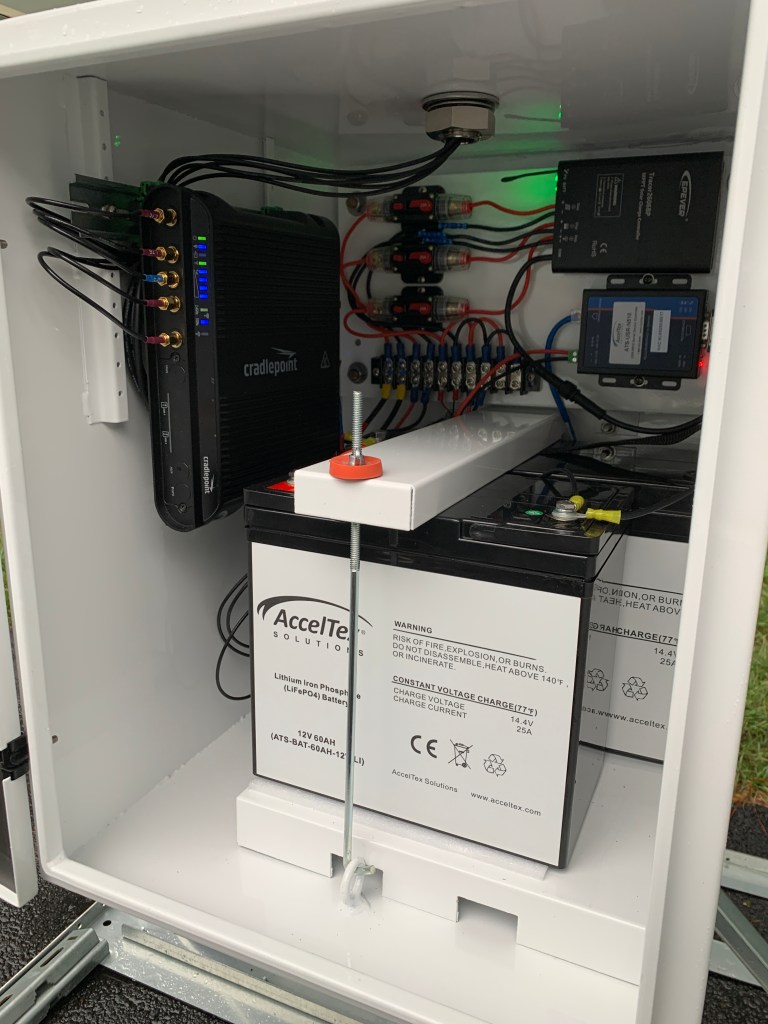
The enclosure, which is the main piece of equipment in the kit, is mostly complete upon arrival. The solar controller, wiring, circuit breakers, LTE antenna, bus bar, and remote monitor are fully assembled within/on the enclosure. To be totally honest, I was a little disappointed that I didn’t have more wiring to do because I enjoy that sort of thing.
Also pictured here is the battery tray and solar panel wiring harness.
Now that I had everything unpacked and organized, I began building the kit. Smitty had emailed me the kit installation documentation prior to the kit’s arrival. The installation documentation is easy to read and thorough. The install documentation is prepared with the purchaser in mind and includes information such as panel degree tilt which is specific to your location. In our case a clear view of the southern sky at a 51 degree tilt was what we needed.
Assembly is definitely made easier by having another set of hands; something I wasn’t lucky enough to have during my assembly, but I made it work.
Enclosure mounted to the mast, all mounted to the sled
Soldering was not required for our kits but I decided to solder the spade connectors to my Cradlepoint router pigtail so that I knew the connection was good. This was one of the few things that I decided to do outside of the installation documentation to make for a better install. As far as the wiring is concerned, the only connections that need to be made to the system are the leads that go to the solar panel and the pigtail that supplies power to the Cradlepoint router. The bus bar has two additional locations for 12v equipment if you have the need.
Batteries installed and wiring complete
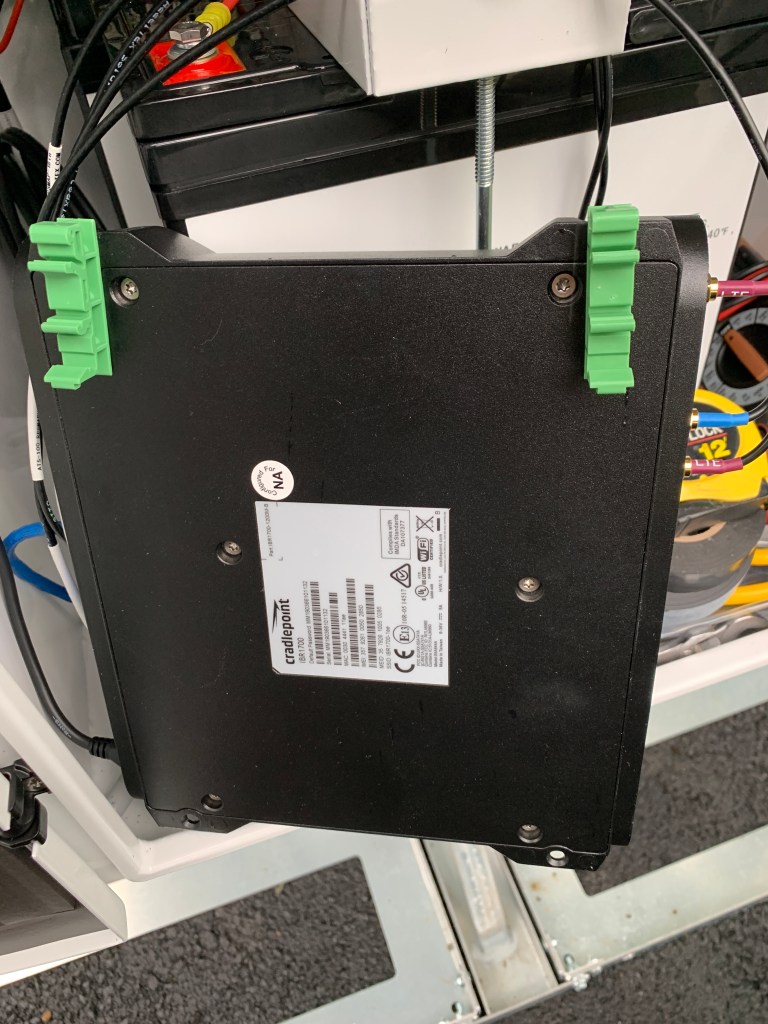
This was another point where I decided to go outside of the installation documentation. I ordered some DIN mounts so that I could mount the Cradlepoint router to the DIN rail, which is provided inside the enclosure.
DIN rail mounts attached to Cradlepoint
I’m a stickler for clean cabling so I took my time to make sure all of the cabling was tidy and not loose within the enclosure. I was able to take the Cradlepoint router pig tail and create a service loop, which I attached to the DIN rail with a zip tie. I also routed the LTE/GPS leads behind the DIN rail so that both the antenna leads and router pigtail would be hidden behind the Cradlepoint router once it was installed.
Cradlepoint pig tail attached to DIN rail. On the back panel you can see the solar panel lead passing through it’s cable gland and connected to the bus bar
To this point, I had done the assembly in my basement. Once the wiring was complete it was time to move everything outside onto my driveway. Even though it was about 50% assembled, it was pretty heavy. If you plan on placing one of these kits in an elevated location, such as a roof, I would suggest hauling the parts up un-assembled. Our team has been doing just that since the remaining kits arrived and it has been working very well. They have been hoisting all of the materials to their permanent locations with the intent to come back at a later time for assembly. So far it is taking almost as long to lift everything to the roofs as it is to assemble the kits.
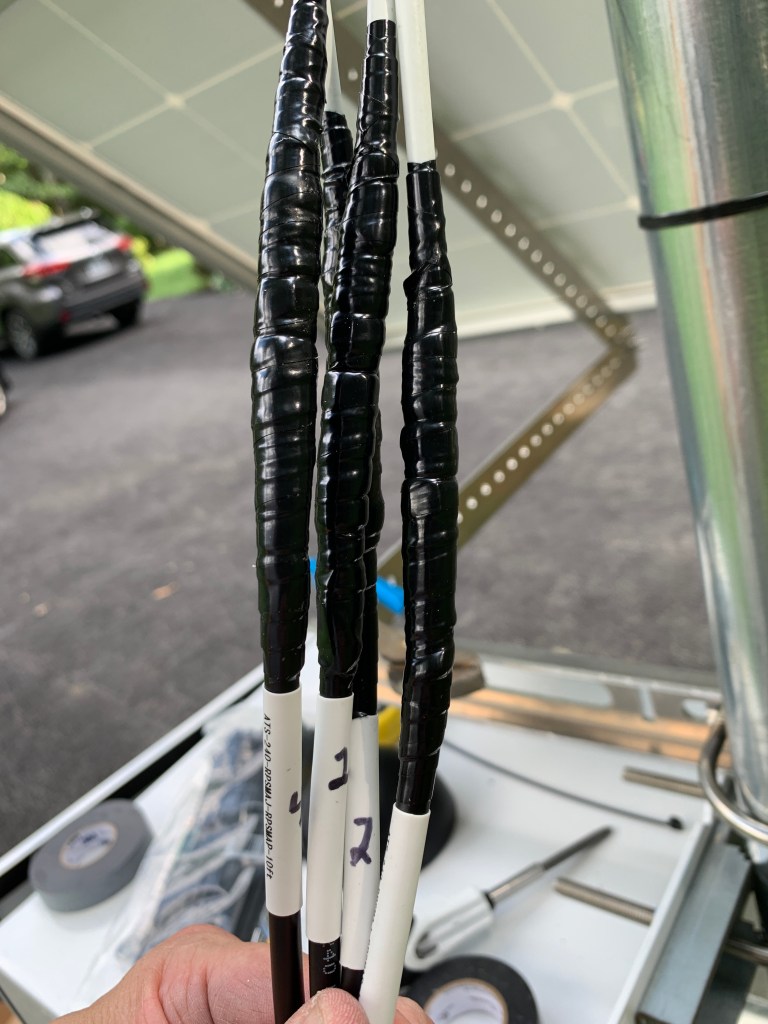
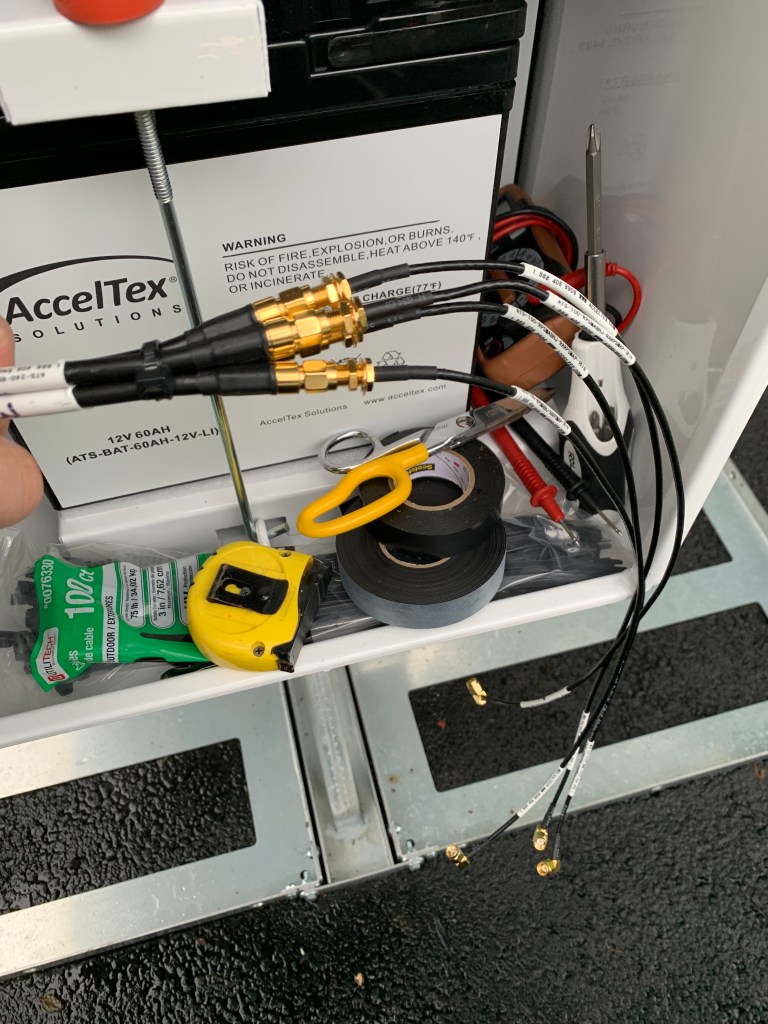
Once I had everything moved outside, there were only a few remaining things to assemble; mainly the solar panel and external wifi antenna. At this point, the most time consuming part of the installation was started. The weatherproofing. Since the mast extends a good distance vertically, cable extension leads were provided in our kits so that the antenna would reach inside the enclosure. I picked up some 3M Temflex and “good” “regular” 3M 700 electrical tape to handle the weather proofing. Once I got the leads unwound and connectors tightened, it took me another 20-30 minutes to properly weatherproof all of the cable leads. Often overlooked, this, in my opinion, is a very important step. This is probably the amateur radio operator in me coming out. After some discussion with my teammates, we decided that weatherproofing the cable assemblies prior to install day would be a timesaver.
3M Temflex followed by 3M 700 electrical tape over the RP-SMA connectors of the antenna leads for weatherproofing
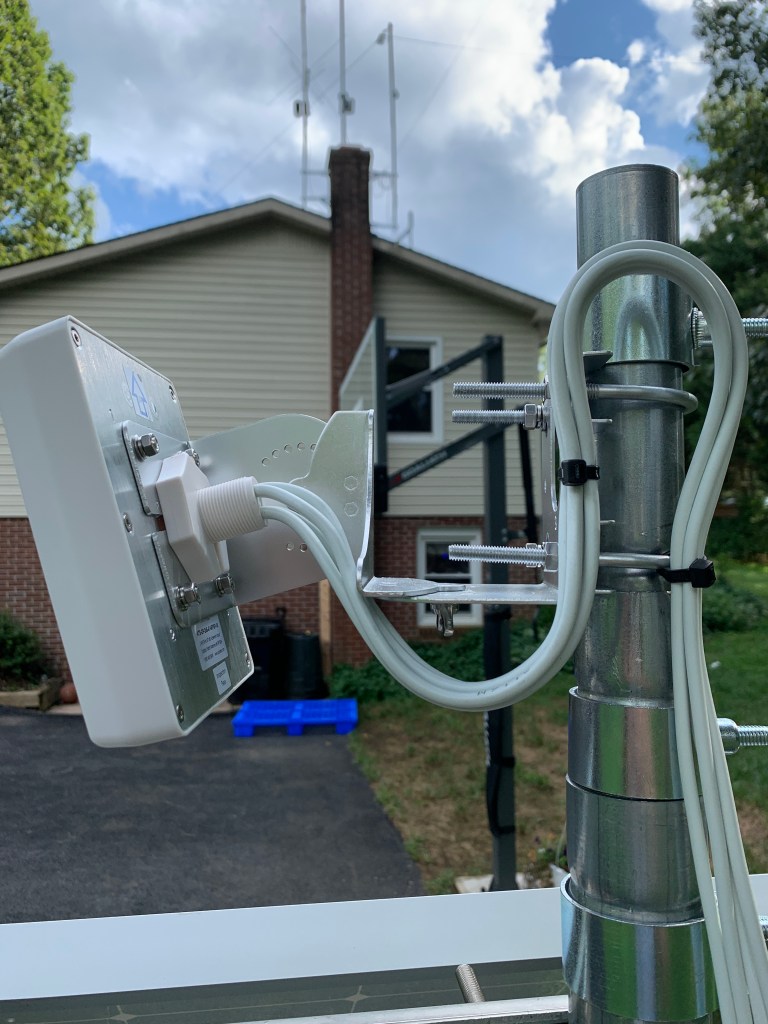
Once the leads were assembled and weatherproofed, I mounted the AccelTex ATS-OP-245-47-4RPSP-36, which we affectionately refer to as the “Everyman’s Antenna” because of it’s versatility. In this case, we chose the four lead RP-SMA Everyman’s because the Cradlepoint IBR1700 has four RP-SMA connectors for the wifi antenna and it met our requirements.
After the antenna was mounted I strapped the leads to the mast with a removable strap, in this case velcro because I didn’t have anything else at the time and I wanted to be able to easily move the mast up or down without having to cut zip ties. I would highly recommend strapping the cables so that they aren’t catching wind and/or rubbing against any metal pieces, which could cause the insulated jacket to fail.
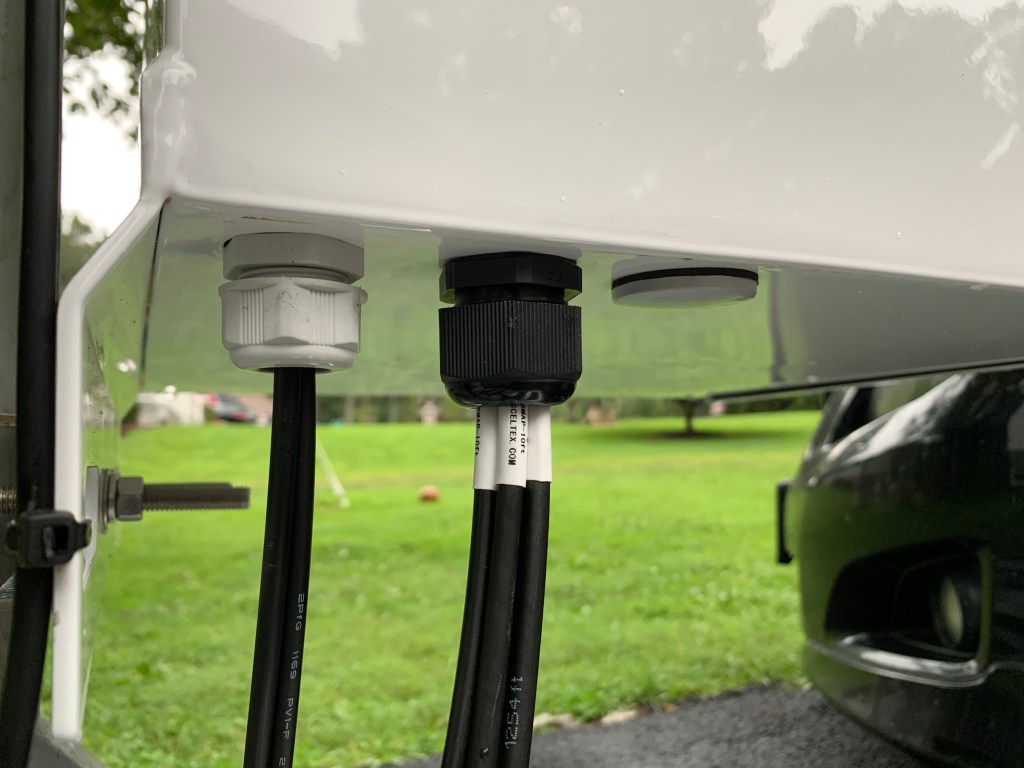
One thing I would potentially recommend to AccelTex would be to include larger cable glands for entry of the antenna leads into the enclosure. The enclosure comes with two cable glands and third blank. One of the cable glands is dedicated for the solar panel wire harness. The four leads that I had for my antenna would not fit through a single cable gland. I have spare cable glands from other projects so I removed the gland that was shipped with the kit and replaced it with a larger M25 gland that accommodated all four leads perfectly. Once I discovered the better fit, I ordered a couple more bags so they could be used in the remaining kits.
Stock cable gland on left. Larger, M25 cable gland on right.
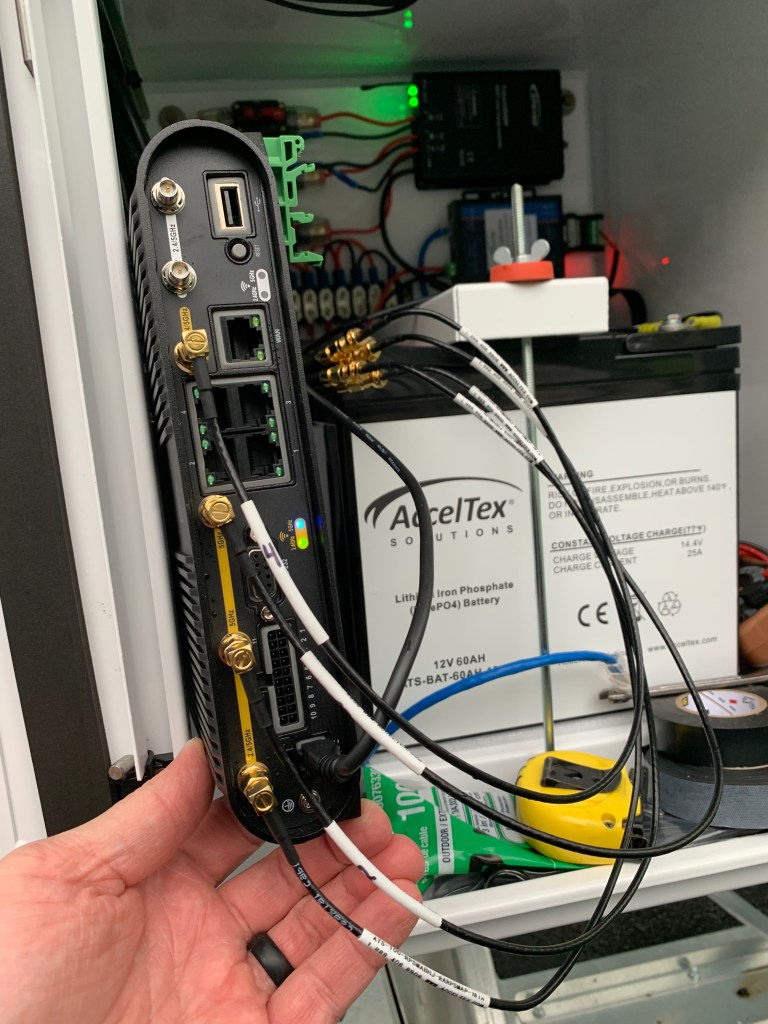
Once I had the antenna leads into the enclosure, I attached smaller, more flexible leads to the existing leads before finally attaching them to the Cradlepoint. I am glad AccelTex includes the smaller diameter leads as it makes for easier cable routing, and an overall nicer install. I tightened these leads to the existing leads but did not weatherproof the connectors because they would remain inside the enclosure. I was able to make sure this would happen by fastening a zip tie around the leads just inside the enclosure. By doing this, the leads could not slip back through the cable gland.
External leads were run through the cable gland and then attached to smaller diameter internal leads. I attached a zip tie so they would not slip back through the cable gland.
Once I had my cabling in order, I attached the LTE/GPS antenna and wifi antenna leads to the Cradlepoint router and attached it to the DIN rail.
Wifi antenna leads connected to the back of the Cradlepoint router
LTE and GPS antenna leads connected to the Cradlepoint router which is mounted to the DIN rail
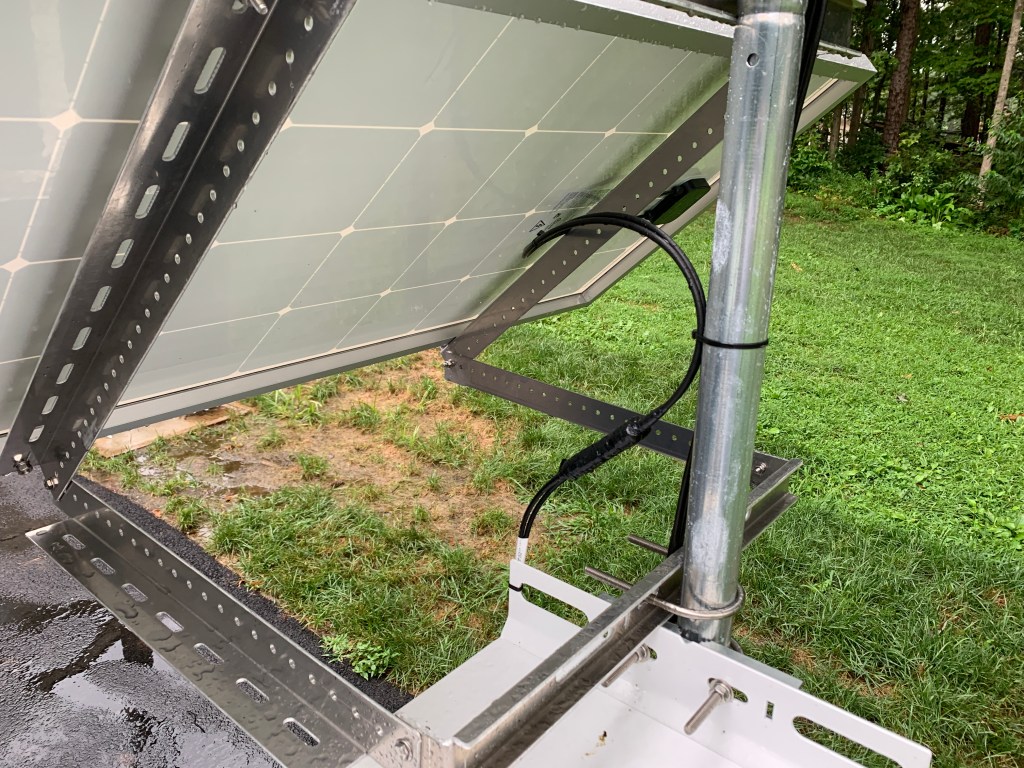
After the router antenna leads were connected, I was mostly done. I had mounted the solar panel earlier, which was relatively straight forward. I tidied up the cables that were on the outside of the enclosure and weatherproofed the solar panel quick connectors that were on the leads. I found out later this was not necessary because the connectors are designed to be weatherproof already.
Weatherproofed solar panel quick connect power leads
Cleaned up cabling
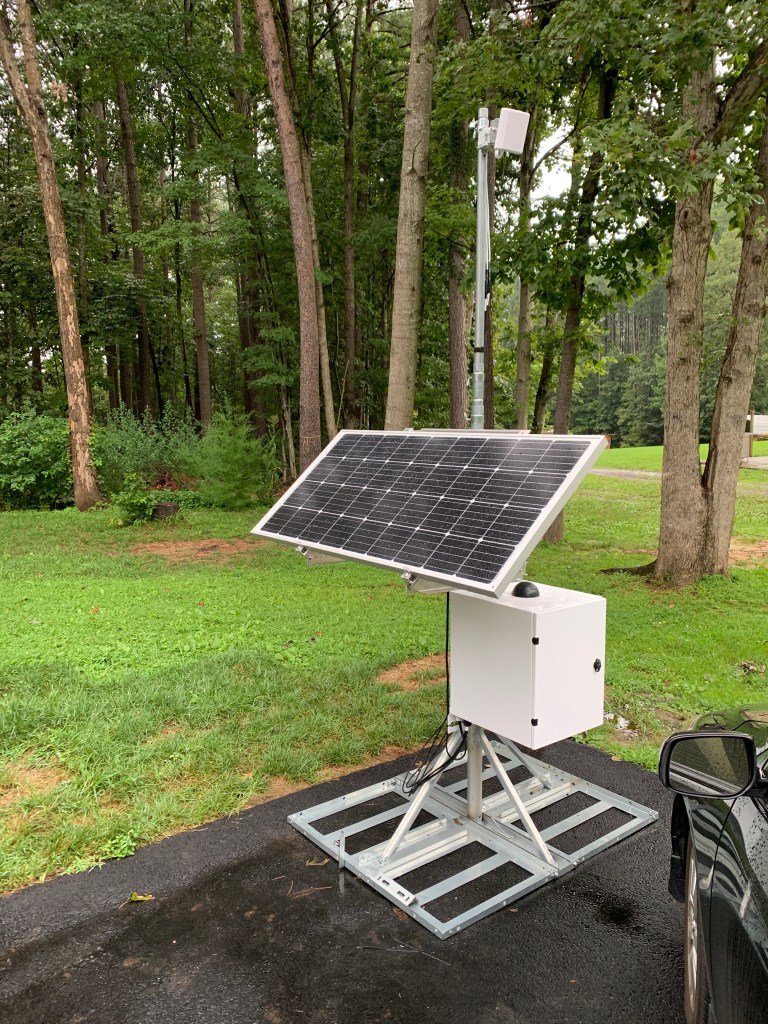
Finished product
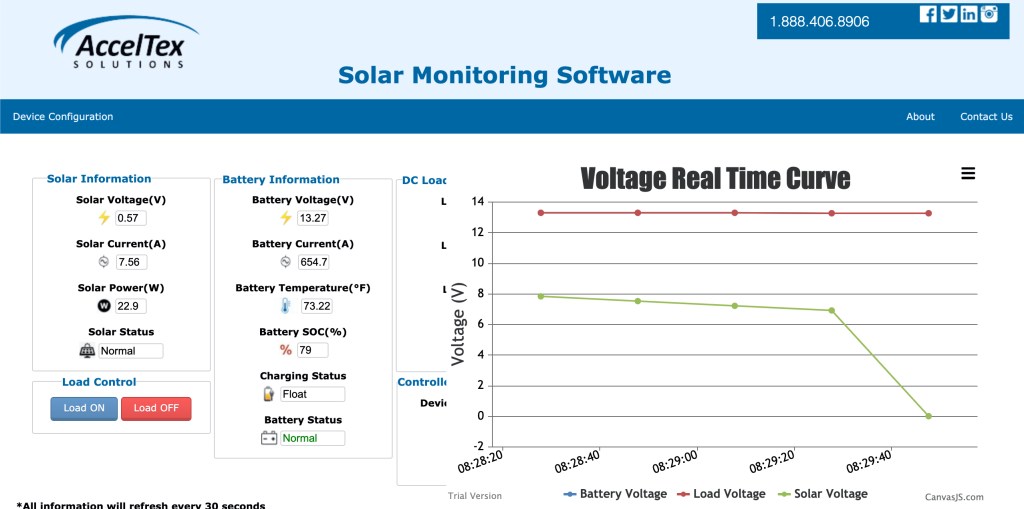
The kit we chose has 160 Ah battery capacity and a 180 W solar panel. We also chose to add on a remote solar monitor so that we could monitor charging and battery conditions at each site. The batteries have been online for almost two weeks, through cloudy days and night time, and have remained online since they were wired up. The battery capacity can be sized to your needs.
Remote solar monitor
Overall, this kit exceeded my expectations. The directions were great, the assembly was straightforward, the parts are high quality, and it looks awesome. Although assembly does require that you have some basic knowledge of wiring and light electrical work, it can be completed by most everyone. Everything went together very well and the first few production units are currently online at their school sites and working well.
In a time with many unknowns and changes that can come at any moment, this kit helped us adapt and get essential network resources outside of our school buildings, reliably, and in a short amount of time. These kits are very versatile and can be placed most anywhere which makes them that much more important right now while school districts are trying to figure out ways to extend their edge outside of their buildings.
As we already know, it is pretty crazy out there right now. I am very blessed and I feel it is somewhat of a responsibility to share knowledge like this right now. If you think this solution could help your rural school district, urban school district, or any other vertical where you need to extend network capabilities during these trying times, please feel free to contact me. I will do what I can to help out and/or try to get you in touch with someone who can. We can get through this if we all work together!
What is causing the mass exodus of some of the most prominent, customer facing employees at Ekahau? People like this just don’t leave. Many of you are like me and are wondering what is going on over there. I am worried as a customer. I am worried as a friend to current and former employees. I am worried as a person who loves Ekahau’s tools and software.
I, like many of you, have been involved with beta testing, webinars, interviews, and just liked to be around Ekahau and the people who make it great. One of the most appealing things about Ekahau is how they relate, listen, and respond to their customers. They have built tools that make our jobs easier and help us to be successful. As a guy on the outside, it looks as though the folks at Ziff Davis either don’t understand this or think it isn’t valuable. It would seem that they would understand this type of relationship and how it has made Ekahau great prior to it’s purchase. So why are all these valuable assets leaving? I just don’t get it…
So here it is. j2 Global and/or Ziff Davis, I’m asking that you tell us what is going on. Why are industry leaders leaving in droves? Please don’t direct your answer to me. Direct your answer to your wireless constituents.
There is a fire burning and it is getting out of control. Put the fire out before there is nothing left to salvage. I know you don’t owe us anything but your silence on this matter is only going to fuel the flames. Make sure you are honest with your answer. The continued success of your product is in the hands of your customers and we want answers! We care about the product, we care about the company, but most of all we care about the people and the relationships they have built. We don’t want to see something very special, die.
Things are NOTok. You CANNOTignore this. People are talking…
I am speechless my friend. I am shocked and saddened by this news and am very worried about what is happening with @ekahau currently and where things are headed. Let me know if you need anything. You and Nicolas Cage will be missed in the community greatly.
Yep I'm suddenly very worried about our product investment in Ekahau now. Wondering if it is worth renewing the maintenance now. 3 key people leave in a short few weeks, and that's only the visible part of the iceberg I'd guess.
Wow. What is going on?….I just bought Ekahau Pro this week!…looking for my receipt for return policy…. Thank you for your fantastic work and inspiration. I met you the first time at first WiFi Trek in Raleigh and you left a fantastic impression on me. Best Success 2U!
Jussi, we only met once at this year's WLPC but you treated me like we were friends for a while. I've never, in my VERY long IT career, met a product evangelist, or a WiFi Janitor, as passionate and engaging as you in that role. Ekahau is less without you. There. I said it.
Sad to see you go. I have a hard time separating Ekahau from Jussi. Hate to say it, but with some of the most forward-thinking minds in the world of WiFi tools making an exit, I wonder if Ekahau will maintain it's market dominance.
Jussi! This is incredibly sad news. You have been such a huge part of @ekahau and the wifi community and cannot be replaced. It is very concerning to see so many departures from @ekahau so close together. I hope whatever is causing people to leave is fixed immediately.
Wow! First @Potato_Fi and now you?!? What it's happening in there?! Starting to get concerned with the future of Ekahau and the path they are taking… Anyway, it was a honor and and privilege to meet you. Thank you so much for all that you have done.
Jussi, we only met once at this year's WLPC but you treated me like we were friends for a while. I've never, in my VERY long IT career, met a product evangelist, or a WiFi Janitor, as passionate and engaging as you in that role. Ekahau is less without you. There. I said it.
@ekahau@ookla@ziffdavis wtf are you guys doing? This wave of resignations at Ekahau is making me seriously doubt the future of your company and products… Shame, because it's been so great thus far.
I think there are hundreds, even thousands who would like an answer as to what is happening. Silence from the owning firms of @ekahau is not helpful. Certainly they are hearing social media, but their non-answers is saying a lot also. The close knit Wi-Fi community wants to know!
Virtual Cell is NOT going to be part of Fortinet’s upcoming .11ax access point product line. I’m not certain of the exact reason but it would seem that the cost of engineering a chipset with proprietary features and efficiency gains from the advancement in technology brought by the new standard, it wasn’t feasible to move forward with keeping Virtual Cell in the .11ax product line. Keep in mind that many of these advancements and efficiencies in .11ax are very closely related to the benefits that Virtual Cell was originally created to solve. Virtual Cell solved many co-channel interference issues using methods very similar to BSS coloring. Also many of the efficiency gains of OFDMA seemingly outweigh the need to continue the development of Virtual Cell within the .11ax standard.
*** Virtual Cell WILL continue to be supported in existing Virtual Cell capable access points. Thanks to Colin Hardacre for the reminder**
Only for the 802.11ax (FAP-U431F & FAP-U433F) when they release later in the quarter. There will still be support for VC/SCA on all the legacy AP's (wave1/2) 11ac. But yes 802.11 r/k/v and .ax has reduced the advantages of the solution, it was a bitter pill to swallow #RIPSCA
As many of you know, Virtual Cell is very near to my heart. We have one of the largest Virtual Cell networks in existence and we have been very successful with it. I would be remiss if I didn’t acknowledge that Virtual Cell has been beneficial to my career. I always felt it was cool that I was able to work with technology that was different than all the others and have it work great despite what others said. The proof is in the pudding. Virtual Cell does work at scale and works very well. Although I will miss all the positives and negatives that come with going on #SingleChannelAdventures, I understand the move to discontinue Virtual Cell development going forward.
I’d like to take this time to thank Paul Lambert, Harish Gnanasambandam, Kaushik Dash, Vikas Banerjee, and Praveenkumar Subramanian for all of the support while working with Virtual Cell. The support from these guys have been invaluable while working with a network that supports upwards of 80k concurrent devices daily. I look forward to working with them as we move towards (and beyond) .11ax.
A very special thanks to Dr. Vaduvur Bharghavan, Srinath Sarang, Joseph Epstein, and Sung-Wook Han. Without these four men, it is quite possible the wireless network industry may look a little different… especially 802.11ax.
Here is datasheet for new 802.11ax access points from Fortinet.
Check out Fortinet’s blog post about their new 802.11ax access point product line here.
Note – Lighthouse image was used with permission from Ranveig Marie Photography. Check out her stuff here: Instagram, Facebook, and Flickr.
This is part three of a multi-part post describing the tuning of Single Channel Architecture/Virtual Cell and taming ChromeOS roaming behaviors. Part one can be found here. Part two can be found here.
We are very densely populated with access points to accommodate at least 50-60 devices per classroom at any given time. Because of this AP density it is necessary to make adjustments to the network on occasion.
As indicated in part two, pcaps determined that we were decoding beacon frames with valid FCS into the high -80s dBm, all with the same BSSID (Virtual Cell). Even though there were several different devices consuming wifi in the area, Chromebooks were hyper sensitive to the fluctuating SNR and were the only device type continuously performing four way handshakes due to a triggered roam (SNR <=18).
Since we are so densely populated with access points (to meet requirements), the only way to tune away the issue was to increase the minimum base transmit rate even further (from 24 Mbps).
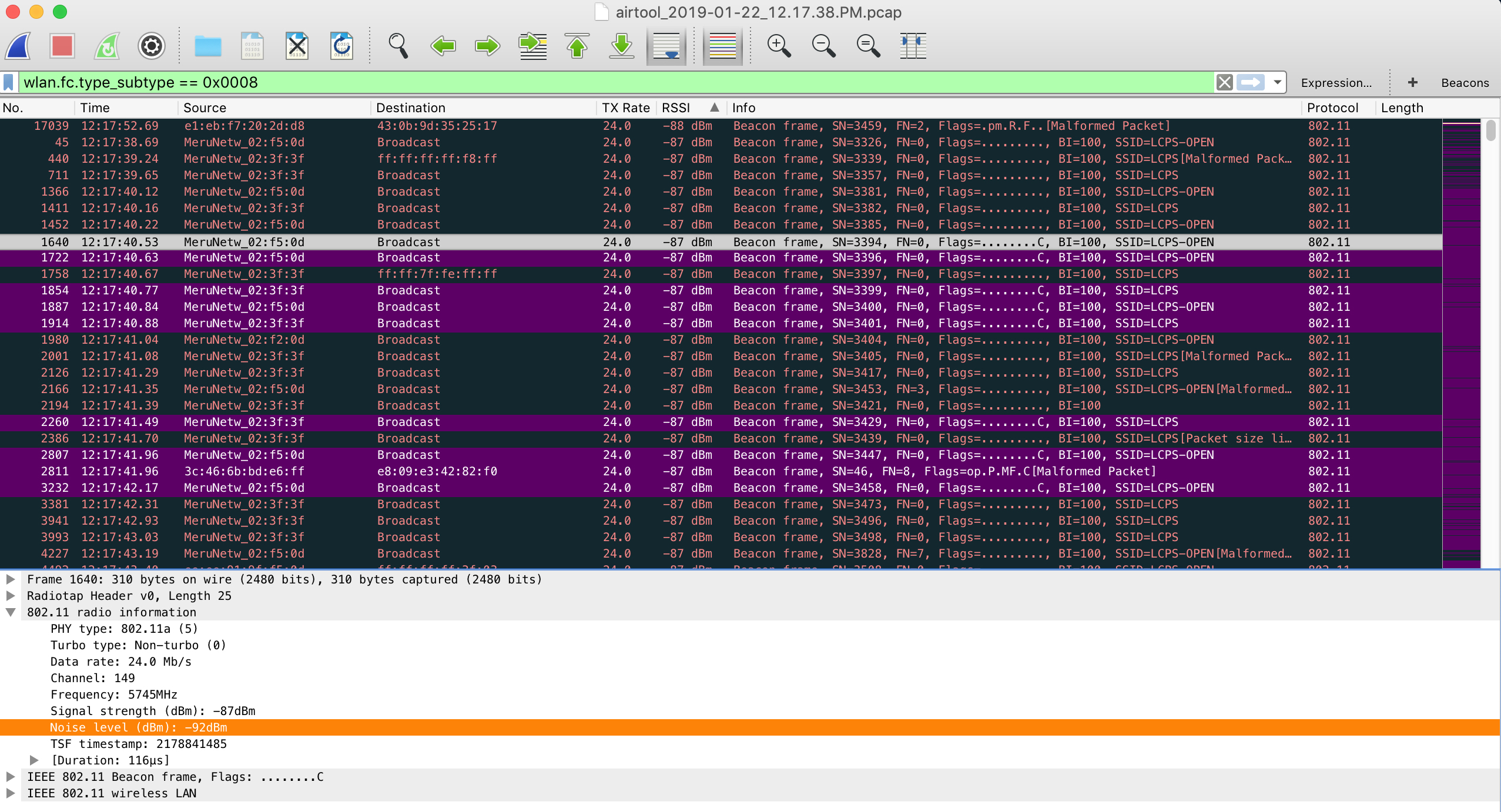
24 Mbps Base Transmit Rate – 5 GHz Radio
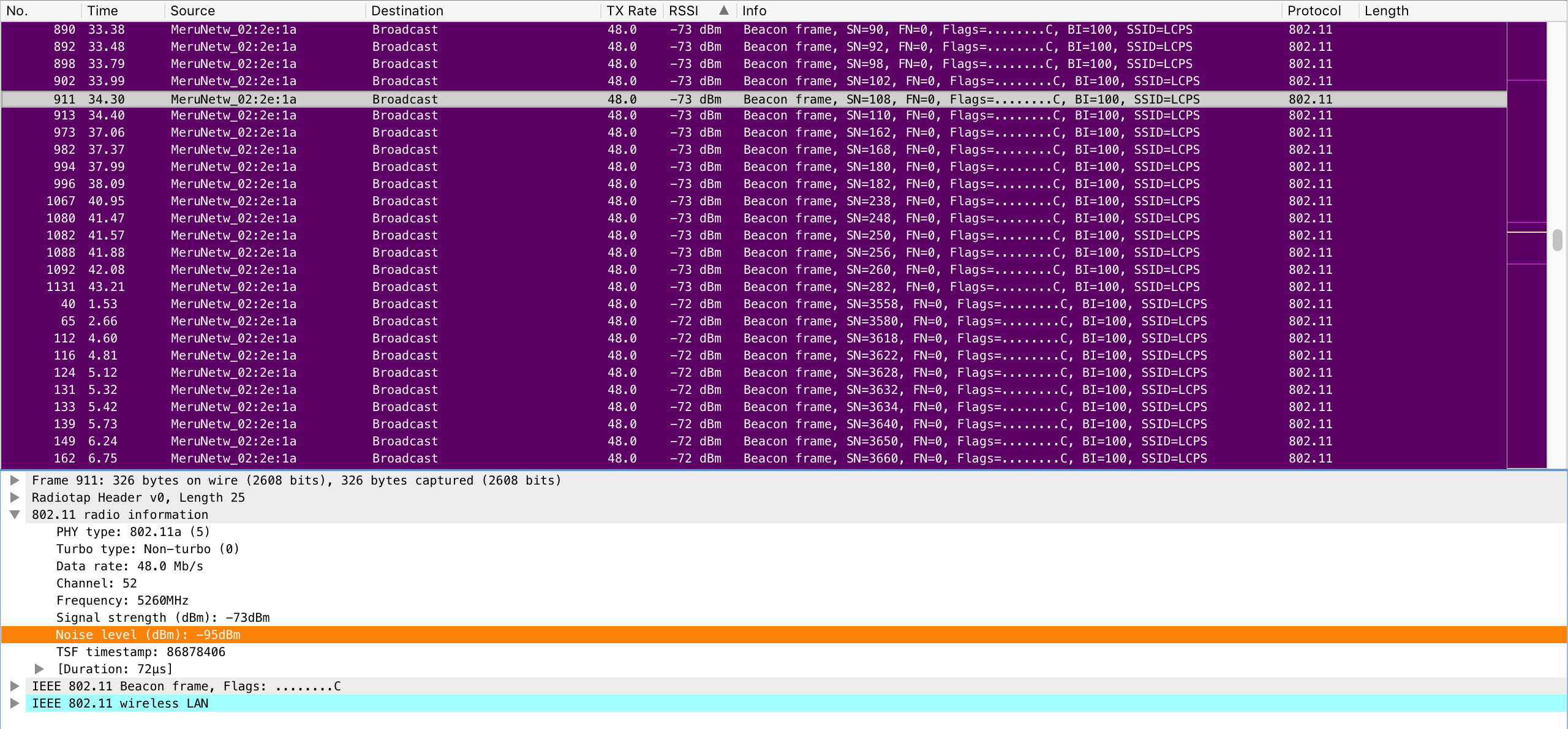
TX power is already reduced to a level that provides proper overlap between classrooms to satisfy requirements. Increasing the minimum base transmit rate to 36 Mbps was done first but did not yield the results that I wanted to see. I then increased the minimum base transmit rate to 48 Mbps (also leaving the supported rates of 24 and 36 Mbps) and ran another pcap.
48 Mbps Base Transmit Rate – 5 GHz Radio
This time I was receiving most beacons with valid FCS in the mid -70s dBm. Further testing with the Chromebooks showed the results I wanted to see.
Unnecessary (triggered) roams were dramatically reduced and performance was much better. Beacon overhead was decreased by 50% which is indicative of moving from 24 to 48 Mbps minimum base rate.
We ended up testing this configuration change at a couple of our high schools of similar layout, design, and requirements with very good results.
Note – Lighthouse image was used with permission from Ranveig Marie Photography. Check out her stuff here: Instagram, Facebook, and Flickr.
This is part two of a multi-part post describing the tuning of Single Channel Architecture/Virtual Cell and taming ChromeOS roaming behaviors. Part one can be found here.
It is no secret at this point that I maintain a very large Single Channel Architecture/Virtual Cell wireless network. From time to time there are certain nuances that force our hand into making adjustments to the wireless network, which really is no different than any other network, SCA or MCA. Since we do primarily use a single channel throughout our instructional spaces, a single, identical, BSSID is seen by all clients within a Virtual Cell. Recently I was troubleshooting network performance issues on Chromebooks and found that they were constantly performing four way handshakes, several times per minute. Other devices in the area, including my Mac, did not experience the same problem. I decided to pull some pcaps to see what I could find. I ran Wireshark for a period of time then filtered out beacons (wlan.fc.type_subtype == 0x0008) and sorted them by lowest to highest RSSI. What I found next started to pull things together from several other recent troubleshooting sessions. I found that my beacons, all from the same BSSID, had valid FCS and were being received with RSSI into the high -80s (dBm). This only left room for an SNR in the single digits.
Because the SNR was so low on these distant beacons, unnecessary roams were being triggered on the Chromebooks even though there was ample signal available from much closer access points. From one second to another, a device could hear several beacons with the same BSSID, some with very poor SNR and others with very favorable SNR. For the last couple of years we have found a sweet spot with TX power and minimum supported rates which has worked nicely with the vast majority of the 80,000 devices we see at peak on a daily basis. Until the recent influx of Chromebooks (tens of thousands) in the past school year there has been no reason to make any adjustments.
RX-SOP?
Stay tuned for an upcoming post on changes that were made to the infrastructure to make these sensitive devices behave better.
Note – Lighthouse image was used with permission from Ranveig Marie Photography. Check out her stuff here: Instagram, Facebook, and Flickr.
This post will serve as part one of a multipart post concerning recent happenings involving client settings, client behavior, what was done to tune a network, and the results thereafter.
Chromebooks have been around for several years now and love them or hate them, they are here to stay. Chromebooks began as a low cost consumer device but have since crept their way into the enterprise, as well as established a strong foothold in the K12 vertical. What originally seemed like a cheap compute option, is now available in many different hardware options, many times offering “better than decent” performance for an affordable price. Don’t be fooled though, there are plenty of Chromebook devices out there that sport less than desirable performance but rep a very attractive price tag. This initial post explains my desire to get a better understanding of Chromebooks and their behavior on my beloved wireless network.
We currently have tens of thousands of Chromebooks in our Google Domain that are owned and managed by our school district. We recently reached over 80,000 concurrent wireless devices on our network and ChromeOS serves as a sizable percent of that number, steadily creeping towards surpassing iOS. Most of the time everything works great but when there are issues reported, you can bet there is a very good chance the device in question is a Chromebook. Known issues in the past have been cleared up by Google in relatively short order. Other times, issues linger on and off, coming and going like the ebb and flow of an ocean tide. In the recent past our district standardized on a specific manufacturer and model of Chromebook that would be purchased and supported by our department staff. Many people were brought together to make sure the device met and exceeded our expectation for an exceptional user experience. Keep in mind there are several thousand other Chromebook devices still on our network which are either legacy holdover or BYOD devices. Ironically, despite the vast differences, many of the Chromebooks exhibit similar behaviors. This post will go on to explain my thoughts as to why this may be.
To get a better understanding of Chromebook behavior on wireless networks, I decided to collect data on my own. This was done to see if I could correlate behaviors with known issues. I decided to create a simple form on my blog that asked for a few pieces of information easily obtained from a Chromebook with a few commands. The following information is what I was interested in:
Chromebook Full Model Name
ChromeOS Version
WLAN Adapter Model
Roam Threshold
Country
Overall, I was fairly underwhelmed with the response but I did get a handful of responses (thanks to those who contributed). Out of the responses I did receive there was one very interesting thing that stood out. The roaming threshold was EXACTLY the same no matter the manufacturer, ChromeOS version (recent or several years old), or WLAN hardware!
Why would 18 (roaming threshold (SNR)) be the threshold that was selected for ALL variations of Chromebooks? What this means is that if the Chromebook’s Signal to Noise Ratio (the difference between RSSI and noise floor) drops below 18, a roam event could occur because the device deems the signal to be less than optimal. Those of us who have been in the game for awhile know that the inconsistencies in end-point wireless hardware is the consistency. Wireless network hardware is not calibrated by the manufacturer. Wireless network hardware behavior will vary depending on manufacturer, device capabilities, DRIVER VERSION, etc. In fact, two wireless network adapters made by the same manufacturer using the exact same driver, placed in the exact same model device, will behave differently! Why would the very intelligent people at Google think that the same, non-adjustable, roaming threshold was best with so many different variables in play? There may be a good explanation, but so far I have been unable to find it. Other types of devices (ie. Windows) offer the ability to tune roaming behaviors within advanced driver settings. To date, ChromeOS does not allow adjustment to these types of settings.
As mentioned earlier, Chromebooks aren’t going anywhere. They are good devices and fit the K12 environment well due to many factors. As Chromebooks push further out of the consumer realm and into being an enterprise player, Google may need to adjust their one size fits all wireless settings model. The massive difference between home use and enterprise use should drive this change unless there is a good reason not to (I’d love to know, Google!).
Future posts will explain more discoveries and how I was able to tame these K12 beasts, with the understanding that bending a network for a single device type is often dangerous. I like to live dangerously…
The other day I was working in Ekahau Site Survey and ran into an issue that I thought could use some improvement. I took to Twitter to voice my #ESSRequest. Rather than being met with affirmation, I had apparently committed a cardinal ESS sin by setting the scale of my project using the opening to a commercial doorway. I am formally trained in the ways of the ‘hau and I could have swore it was suggested to me that measuring a commercial doorway was a suitable way to set the scale within a project (as long as you actually knew the real measurement of course). After reading the reminders of my idiocy, I came to the conclusion that what my peers were saying did actually make sense. It has been suggested that measuring a known “larger” distance will in fact yield a more precise scaled project. After explanation, it makes perfect sense to me. Trying to be precise within a small area creates room for error. A small mis-measurement of pixels could render your project flawed and the error could grow exponentially as your survey grows. Setting the scale of your project should be done using a known length of something much larger, such as a long corridor, wall, or something of the like.
It sucks being wrong, but I will admit my shortcomings. I am a certified “Expert” but I do come up short sometimes. It is my belief that an expert should always have an open mind and should always be willing to learn new things, even if it is something that he or she “should” already know. In this particular situation, I was re-evaluating what I “should” have already known on my commute to work. Even though I do agree with the #NoDoors policy, it did challenge me to think even deeper about the approach we are to take when scaling our surveys. If measuring a small, “inconsistent” feature such as a doorway within a map could skew your survey data into the toilet, what would the impact of being 5 inches off your line doing a continuous survey be? The center of a zoomed out hallway looks a lot different than a zoomed in hallway within ESS. What if you inadvertently walked diagonally off your line 10 inches in a large open space? Simply zooming in and out between stop and go measurements could make a massive impact to your survey. I know I have done surveys where I zoomed in on the start of a continuous survey and found that I was actually a couple of feet off of my starting mark. Being zoomed out might have you think you are up against the end of a hallway, while zoomed in will show a much larger gap between the wall and your starting point. How do we make our surveys as accurate as possible? Garbage in is garbage out, right? The only way I can think of to get absolute precision is by using a GPS. I have no real world experience using a GPS with ESS but I would think GPS signal within a building is somewhat of a challenge. Perhaps I need an ECSE refresher?
I think the answer to these questions were perfectly summed up by my colleague in a DM while I was conversing with him about this exact issue:
There is no way you can get everything precise within your survey. There are going to be inadequacies and errors. Some of the errors will be inconsequential and some will have a serious impact on your finished product. The best thing to do is use the knowledge that you have to minimize mistakes and make good decisions based on training and experience. Is running a second survey for comparison a good idea? Validation is key, right? Sometimes ultra-precision isn’t practical. Time is money…
At the end of the day we all want to do a great job with our work. We will all make mistakes, even us “Experts.” We will all learn from those mistakes (hopefully). We also need to remind ourselves there is more than one way to get to a suitable solution and delivery is key when putting someone on notice about their ill advised practices.
I still have new questions about the precision aspects to surveys. I am in no way disqualifying the usefulness of ESS. I couldn’t do my job and be successful without it. The good people at Ekahau have created a truly EXCEPTIONAL product and are building on its greatness. Ekahau Site Survey’s greatness is second only to the incredible people who make and teach it. I look forward to each opportunity I get to use the software and I consider myself one of the lucky ones that was able to sit the Ekahau Certified Survey Engineer class. I’m sure the vast majority of ESS users are self taught or are unable to attend an ECSE class for any number of reasons. If you are afforded the opportunity, I STRONGLY recommend taking an ECSE class.