Tag: pcap

  • Distant Beacons – Part 3 – Calming the Seas

    Note – Lighthouse image was used with permission from Ranveig Marie Photography.  Check out her stuff here:  Instagram, Facebook, and Flickr.

    This is part three of a multi-part post describing the tuning of Single Channel Architecture/Virtual Cell and taming ChromeOS roaming behaviors.  Part one can be found here.  Part two can be found here.

    We are very densely populated with access points to accommodate at least 50-60 devices per classroom at any given time.  Because of this AP density it is necessary to make adjustments to the network on occasion.

    As indicated in part two, pcaps determined that we were decoding beacon frames with valid FCS into the high -80s dBm, all with the same BSSID (Virtual Cell).  Even though there were several different devices consuming wifi in the area, Chromebooks were hyper sensitive to the fluctuating SNR and were the only device type continuously performing four way handshakes due to a triggered roam (SNR <=18).

    Since we are so densely populated with access points (to meet requirements), the only way to tune away the issue was to increase the minimum base transmit rate even further (from 24 Mbps).

    24 Mbps Base Transmit Rate – 5 GHz Radio

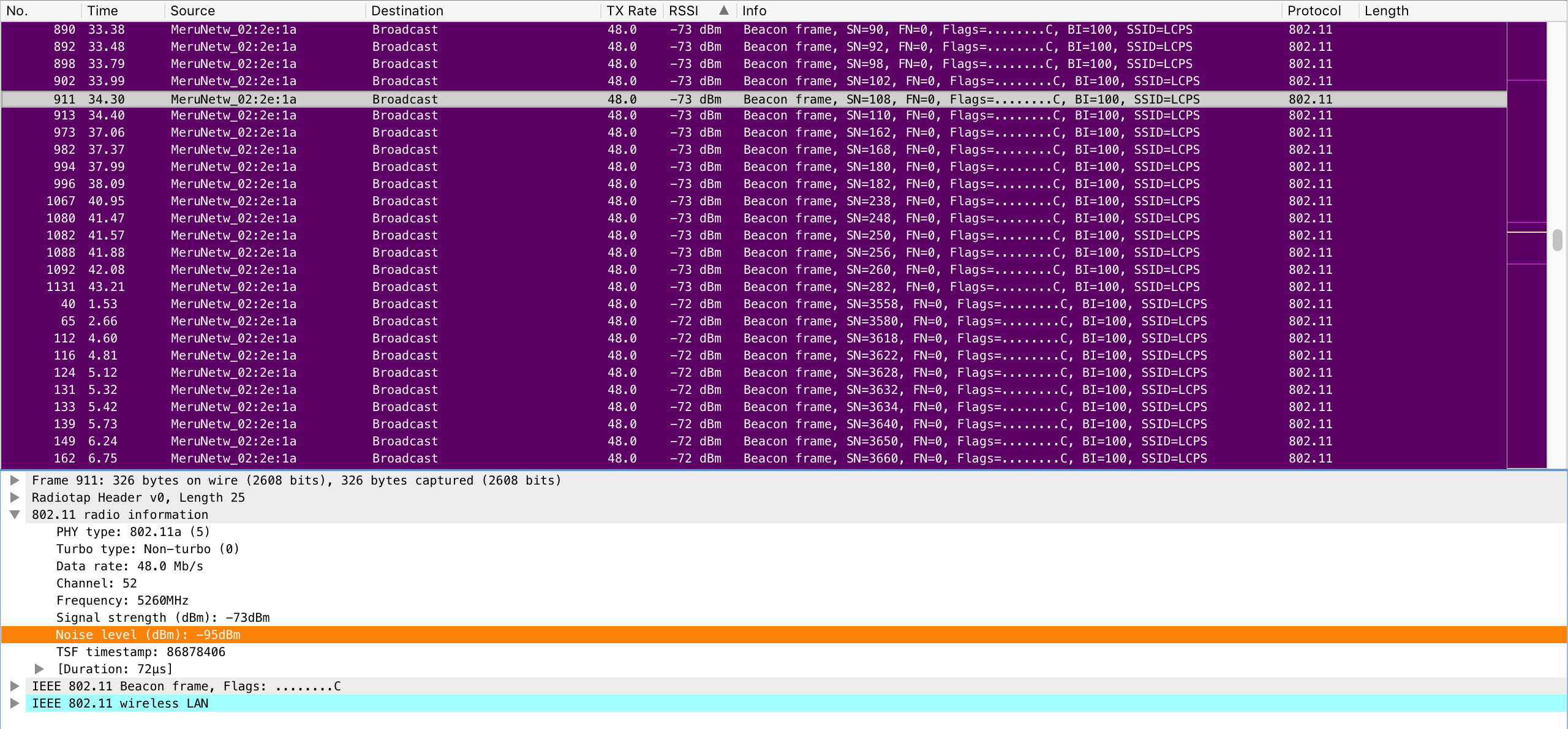
    TX power is already reduced to a level that provides proper overlap between classrooms to satisfy requirements.  Increasing the minimum base transmit rate to 36 Mbps was done first but did not yield the results that I wanted to see.  I then increased the minimum base transmit rate to 48 Mbps (also leaving the supported rates of 24 and 36 Mbps) and ran another pcap.

    48 Mbps Base Transmit Rate – 5 GHz Radio

    This time I was receiving most beacons with valid FCS in the mid -70s dBm.  Further testing with the Chromebooks showed the results I wanted to see.
    Unnecessary (triggered) roams were dramatically reduced and performance was much better.  Beacon overhead was decreased by 50% which is indicative of moving from 24 to 48 Mbps minimum base rate.


    We ended up testing this configuration change at a couple of our high schools of similar layout, design, and requirements with very good results.

  • AirCheck G2 v3.0; Building on a Wifi Testing Stalwart

    There are many good things continuing to happen with everyone’s favorite wifi troubleshooting tool from Netscout.  The AirCheck G2 will have new firmware released this coming week on Tuesday, October 23.  These new features expand on the tool’s already great feature set and should have any engineer feeling even more confident while troubleshooting. Version 3 is bringing many new features to your AirCheck.  Upgrading the AirCheck G2 becomes easier to upgrade with over the air firmware upgrades.  The only requirement to take advantage of this new feature is to have a current support contract.  This is a great time saving new feature. Another feature new to the Aircheck will be the ability to share your profiles with other AirChecks within your organization.  A profile can now be easily uploaded to Link-Live and shared among other AirChecks under your control. Adding to Link-Live’s new versatility is the ability to upload full AutoTest and Connectivity results, session files, screenshots, and packet captures.  I pulled a packet capture for my iPhone after recently upgrading and saw the new option to upload to Link-Live.  I simply selected the Link-Live feature, logged into Link-Live and found my pcap ready for analyzing.  This builds on the ability to quickly transfer a pcap to a USB drive which can be connected directly to the AirCheck. Enhanced AP naming support has been added to get a better idea of which AP you are currently working with.  APs from Cisco, Aruba, Huawei, Aerohive, and Extreme Networks are currently supported.  Hopefully Fortinet will be added soon.  I still rely heavily on my AirCheck G1 for identifying Meru/Fortinet APs due to it’s ability to read the AP ID information element.  I continue to patiently wait… Improved packet captures allow the user to start and stop the packet capture on a specific device or channel.  As mentioned previously, you can also now upload your packet capture to Link-Live for easy sharing of data with others in your organization. Another major enhancement is the ability to transfer certificates directly to the AirCheck using a USB device.  I know this was a request in the past and the good people at Netscout listen to their customers! By now many of you may know that Netscout sold their “tools” to StoneCalibre, a private equity firm, on September 14.  Netscout presented their future plans for the AirCheck and LinkRunner at Mobility Field Day 3 on the same day that the deal occurred but the formal announcement wasn’t made until the following Monday, September 17.  Netscout was clearly aware of what was going to happen but still had a detailed roadmap for their products going forward.  Their confidence seemed to be at an all time high and didn’t appear there was any reason for concern.  I am still very confident in the product line going forward and am excited to see where this deal takes them. If you have a current support contract with Netscout, get ready to download the new firmware this coming Tuesday, October 23.  There are many more features included that I didn’t mention in this post that will enhance the usability of an already great product.