Note – Lighthouse image was used with permission from Ranveig Marie Photography. Check out her stuff here: Instagram, Facebook, and Flickr.
This is part two of a multi-part post describing the tuning of Single Channel Architecture/Virtual Cell and taming ChromeOS roaming behaviors. Part one can be found here.
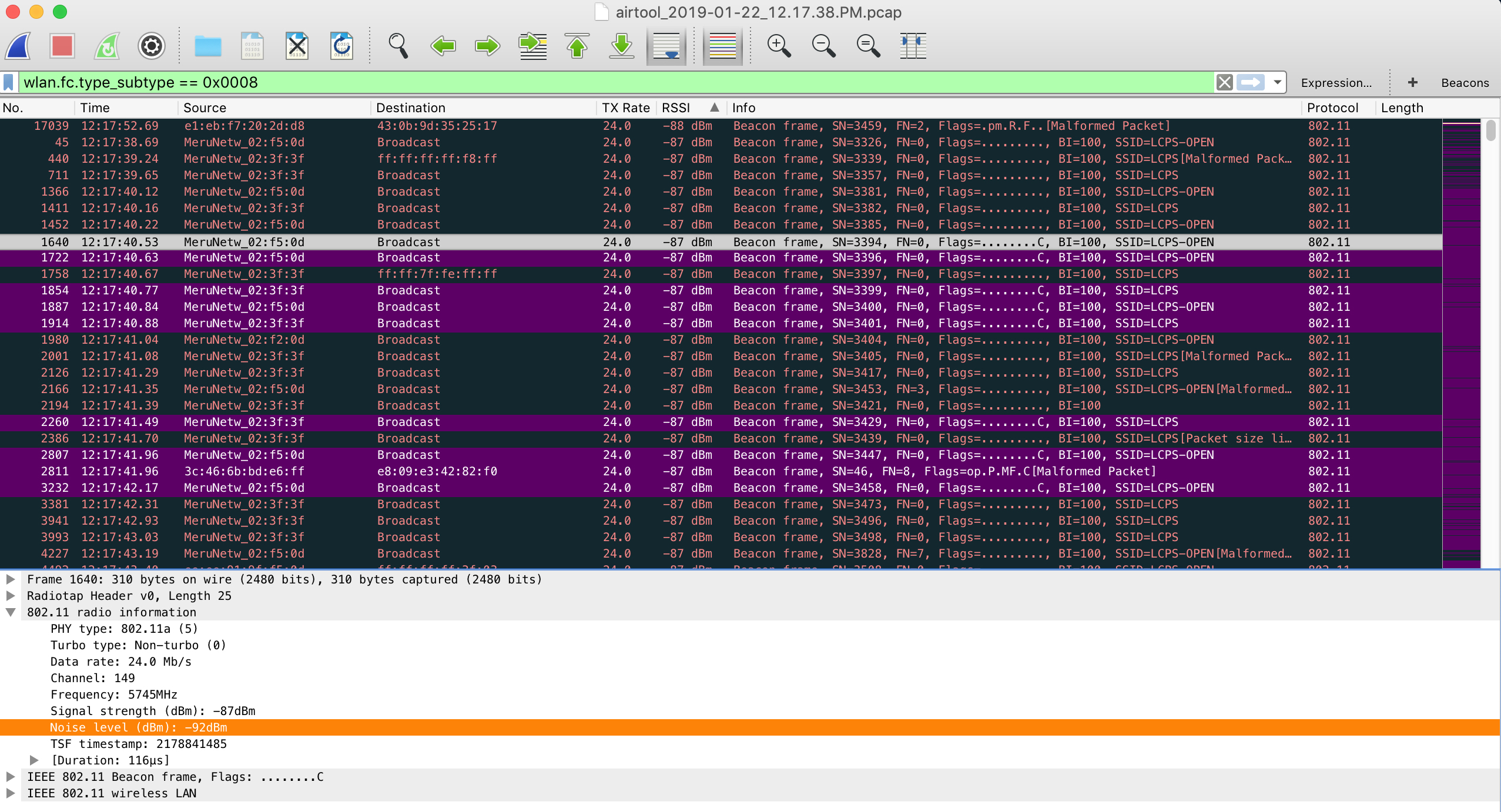
It is no secret at this point that I maintain a very large Single Channel Architecture/Virtual Cell wireless network. From time to time there are certain nuances that force our hand into making adjustments to the wireless network, which really is no different than any other network, SCA or MCA. Since we do primarily use a single channel throughout our instructional spaces, a single, identical, BSSID is seen by all clients within a Virtual Cell. Recently I was troubleshooting network performance issues on Chromebooks and found that they were constantly performing four way handshakes, several times per minute. Other devices in the area, including my Mac, did not experience the same problem. I decided to pull some pcaps to see what I could find. I ran Wireshark for a period of time then filtered out beacons (wlan.fc.type_subtype == 0x0008) and sorted them by lowest to highest RSSI. What I found next started to pull things together from several other recent troubleshooting sessions. I found that my beacons, all from the same BSSID, had valid FCS and were being received with RSSI into the high -80s (dBm). This only left room for an SNR in the single digits.
Because the SNR was so low on these distant beacons, unnecessary roams were being triggered on the Chromebooks even though there was ample signal available from much closer access points. From one second to another, a device could hear several beacons with the same BSSID, some with very poor SNR and others with very favorable SNR. For the last couple of years we have found a sweet spot with TX power and minimum supported rates which has worked nicely with the vast majority of the 80,000 devices we see at peak on a daily basis. Until the recent influx of Chromebooks (tens of thousands) in the past school year there has been no reason to make any adjustments.
RX-SOP?
Stay tuned for an upcoming post on changes that were made to the infrastructure to make these sensitive devices behave better.
Since last week’s open letter to FortiRu, I came to the realization that there may be some confusion related to Fortinet’s AP product line. I decided to throw this post together so that it is easier to understand which APs are what, and which category they fall into. Keep in mind this is a high level overview to simply point out the different AP product lines.
Lets jump right into it…
Fortinet offers three different management options under it’s Enterprise Secure Wifi solution; FortiGate, Cloud, or dedicated controller, and five different AP lines that fall into one or more of those management options.
Excerpt from Fortinet Product Matrix
Access points that can be managed via the ForiGate or the Cloud are broken down here:
The FortiAP-S313C, which was given to attendees of the recent Wireless LAN Professionals Conference, falls into the preceding category. You can read a great blog post about the FortiAP-S313C AP written by my apple butter lovin’ buddy Lee Badman here. Please pay close attention to what Lee says concerning the licensing for these APs. A true game changer…
FortiAP-S313C
There may have been some confusion with the FortiAP-S313C stemming from the Fortinet presentation at WLPC. The FortiAP-S313C is NOT from the Meru pedigree of access points of which I will elaborate on next.
Access points that are managed from a dedicated controller are broken down here:
These APs ARE from the Meru lineage of access points which I affectionately refer to as FortiRu. These APs support Virtual Cell/Single Channel Architecture and are still commonly referred to as Meru access points. The APs in the Standard AP list are all carry over from the Meru purchase. The AP1020 and AP832 are models that we use in our school district and the models that I have the most experience with. Both the AP1020 and AP832 have been rock solid since their release to market. It is often confused that these standard APs are only capable of operating under Virtual Cell/Single Channel Architecture. All traditional Meru access points can operate in EITHER a multi channel OR Virtual Cell configuration.
You may have noticed that under each section there was a group of APs referred to as Universally Manageable. These APs can be managed using any of the three management solutions. Just like its’ Meru predecessor, the Universal AP can be used in EITHER a multi channel OR Virtual Cell configuration depending on the chosen management solution. I should have more to write on the “U” line of APs in the near future as we should be receiving some very soon.
FAP-U421EV
As previously stated, this blog post was intended to be a high level overview of the Fortinet/Meru (FortiRu) AP product line. Clicking on the links and reading through the material will give you a deeper explanation into each of the access points. As always, if there are any questions, comments, corrections, etc, please feel free to reach out to me.
It has been a couple weeks since I returned from WLPC in Phoenix. It was a great trip down to the southwest which included catching up with some good friends, listening to great presentations, learning a lot, and also presenting on a topic near and dear to my heart. I was able to put a lot more names to faces and have some great conversation.
As many of you know I presented on how well single channel architecture works for us. You can find the video below:
I have received mostly all positive feedback on the presentation. It was a great opportunity for me to speak in front of a large crowd and give examples of how we have Meru deployed across our school district. As well as it went, I feel like I need to explain a few things. I have come to the realization that a Ten Talk may have been the wrong platform to discuss the topic at hand. I understand that most people wanted more information about SCA rather than “it just works for us.” Ten minutes was simply not enough time to discuss all of this.
First, I understand that being a large network doesn’t equal wired\wireless networking done right. Even though this wasn’t conveyed in the presentation, I have received feedback indicating as such. Although we are very proud of how large and successful our network is, it doesn’t mean that large = successful. A lot of time and effort goes into making a wireless network work well for 60,000 users on average every day. We all know that architecture doesn’t matter if you don’t define, design, implement, and validate.
Second, I gave some confusing information. I realized shortly after the presentation that the stat showing that we “average ~12 connections per AP county wide” was very vague. Some of our access points have upwards of 100 clients on them at once for an extended period of time. Some of our access points have 10 clients total (maybe less) in an entire day. It doesn’t matter whether there is 30+ clients on an AP during every class or another AP that sits unused for the majority of the day. If an AP was placed in a location, it was done there with the intent that wifi could be needed at any point of an instructional day; planned or un-planned. The opinion that there are too many APs or not is irrelevant. Unless you have actually visited our schools and used the network, you won’t know. The proof is in the pudding so to say.
I know that most of us consider our wireless networks as mission critical. The vast majority of our schools don’t have desktop computers other than in administrative areas. Many of our schools don’t have computer labs, but employ several carts of mobile devices. I know that most of us want NUMBERS to back up the user experience, but most of the time I don’t have time to get this type of information. If reports of “wireless problems” are low or non-existent and teachers are able to complete their instruction using mobile devices and be successful, our mission is accomplished. I know a lot of you won’t be happy until you see NUMBERS and that is fine. I am going to try real hard to get some of those and put them out there. To be perfectly honest, I don’t know if some of you will believe it then, and that is fine too.
I understand many of the things that have been said as far as physics, airtime consumption, high density, etc. I don’t necessarily disagree with some of the opinions. You may be absolutely right! The thing that is somewhat discouraging is that there are a lot of opinions based on no experience or an experience that was several years ago. Don’t get me wrong, the first time I saw virtual port, even with my limited wireless knowledge at the time, I couldn’t believe it would work. A lot has been improved upon since then with virtual cell and especially the equipment. I’m not saying Meru will beat another vendor head to head every time, but I bet it will sometimes! Does it really matter how many jigabits we can ram through the air or is it more important for a user to have an experience where they don’t even notice the wifi? A user sits down, opens their laptop, completes a task, closes the laptop and moves on without even acknowledging the presence of wifi. The wifi just works. Please understand, I am not trying to discount numbers such as channel utilization, retries, available bandwidth, etc. Those are all very important things to consider in a wireless environment. We all look to those numbers first when trouble is initially reported. Those are the numbers that give us a baseline to begin troubleshooting. They are absolutely critical to a successful wireless deployment.
Obviously interest has been piqued since the presentation. It has been fun, most of the time, discussing various aspects concerning single channel vs multi channel environments. I have heard a handful of different people give a handful of different explanations on what Meru’s special sauce is, and they are all different. There isn’t a ton of information out there concerning the “magic” of Meru but if you are truly interested please watch any video by Dr. Bharghavan, founder of Meru networks. Many of these videos are a few years old, but still offer great information. To be honest, I need to re-watch most of them as I get tangled in the “it just works,” sometimes. Below are a handful of videos.
If you want to catch the videos later but still want to read the conclusion, please scroll down.
Meru Networks Wireless Virtualization Architecture – Part 1
Meru Networks Wireless Virtualization Architecture – Part 2
Meru Networks Wireless Virtualization Architecture – Part 3
Contention Management Schemes: Part 1 – Single / Multiple AP
Contention Management Schemes: Part 2 – Multiple APs
Maximizing Air Traffic – Part 1: Maximize Channel Reuse
Maximizing Air Traffic – Part 2: Simultaneous Transmissions
Leveraging Single Channel Architecture for Multiple Channels
A Little Dated But Still Good
Very High Density Wireless LAN Demonstration for BYOD: #1
Very High Density Wireless LAN Demonstration for BYOD: #2
Conclusion
For those of us who went to WLPC 2017, we heard more than one person mention that wireless networking can be done in more than one way. We also heard that less than ideal practices may be employed against our better wireless judgement due to other factors such as politics, aesthetics, etc. Sometimes I think we need to remember that just because someone does something different doesn’t mean that it is wrong. We also need to remember that just because we don’t like a technology it doesn’t mean it doesn’t fit someone’s need. I need to remind myself of this from time to time. We deploy wireless networks, in schools, mines, warehouses, large refrigerators, outdoors; you name it, we put wifi in all kinds of places. Our ultimate goal should be to use the knowledge we have to deploy a wireless network that gives a reliable experience to the greatest number of users.



 good friends, listening to great presentations, learning a lot, and also presenting on a topic near and dear to my heart. I was able to put a lot more names to faces and have some great conversation.