Author: badgerfi

  • Distant Beacons – Part 2 – A Single Port in the Storm

    Note – Lighthouse image was used with permission from Ranveig Marie Photography.  Check out her stuff here:  Instagram, Facebook, and Flickr.

    This is part two of a multi-part post describing the tuning of Single Channel Architecture/Virtual Cell and taming ChromeOS roaming behaviors.  Part one can be found here.

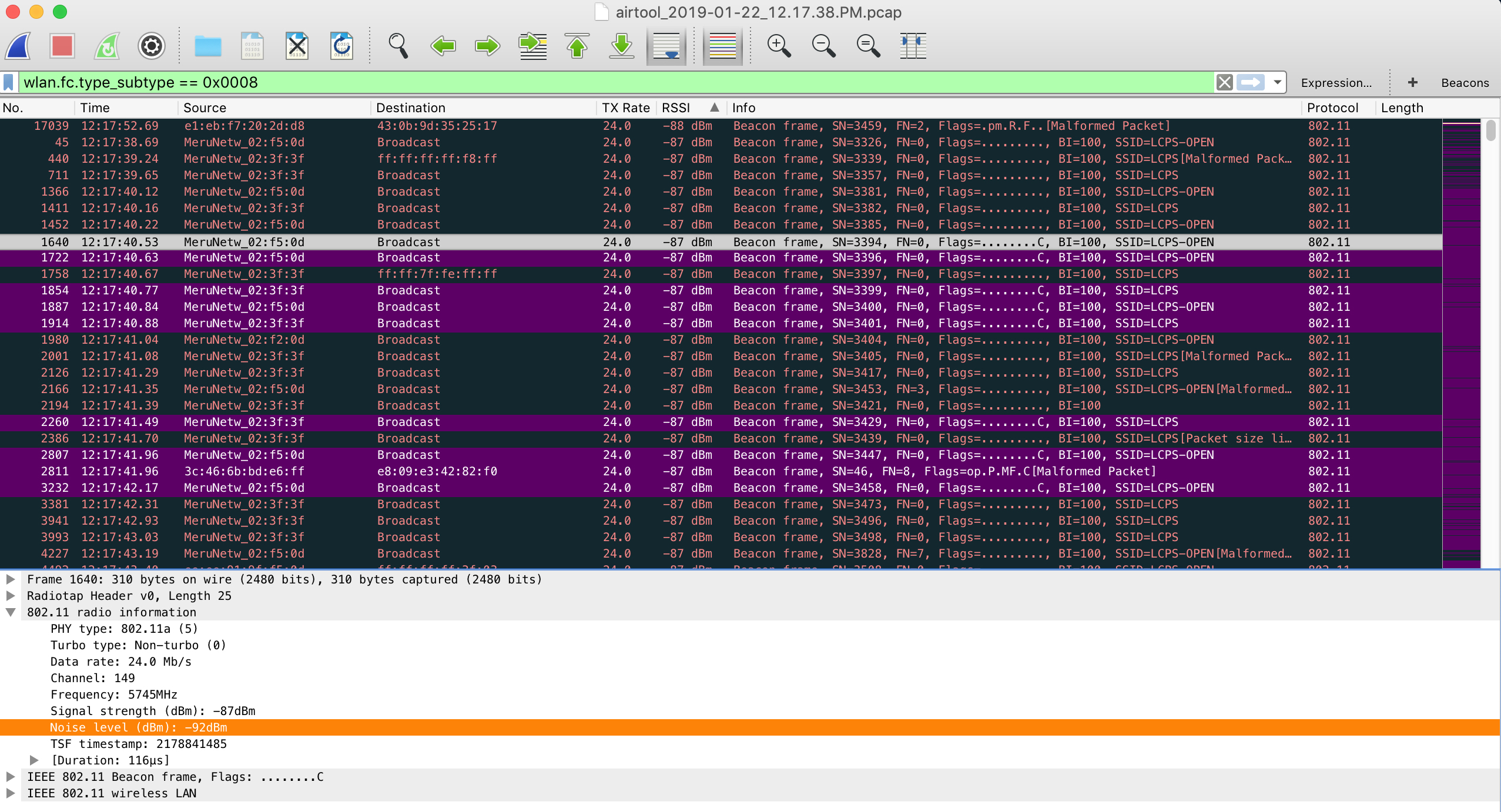
    It is no secret at this point that I maintain a very large Single Channel Architecture/Virtual Cell wireless network.  From time to time there are certain nuances that force our hand into making adjustments to the wireless network, which  really is no different than any other network, SCA or MCA.  Since we do primarily use a single channel throughout our instructional spaces, a single, identical, BSSID is seen by all clients within a Virtual Cell.  Recently I was troubleshooting network performance issues on Chromebooks and found that they were constantly performing four way handshakes, several times per minute.  Other devices in the area, including my Mac, did not experience the same problem.  I decided to pull some pcaps to see what I could find.  I ran Wireshark for a period of time then filtered out beacons (wlan.fc.type_subtype == 0x0008) and sorted them by lowest to highest RSSI.  What I found next started to pull things together from several other recent troubleshooting sessions.  I found that my beacons, all from the same BSSID, had valid  FCS and were being received with RSSI into the high -80s (dBm).  This only left room for an SNR in the single digits.

    Because the SNR was so low on these distant beacons, unnecessary roams were being triggered on the Chromebooks even though there was ample signal available from much closer access points.  From one second to another, a device could hear several beacons with the same BSSID, some with very poor SNR and others with very favorable SNR.  For the last couple of years we have found a sweet spot with TX power and minimum supported rates which has worked nicely with the vast majority of the 80,000 devices we see at peak on a daily basis.  Until the recent influx of Chromebooks (tens of thousands) in the past school year there has been no reason to make any adjustments.

    RX-SOP?

    Stay tuned for an upcoming post on changes that were made to the infrastructure to make these sensitive devices behave better.

  • Distant Beacons – Part 1 – One Size Sail For Every Ship?

    Note – Lighthouse image was used with permission from Ranveig Marie Photography.  Check out her stuff here:  Instagram, Facebook, and Flickr.

    This post will serve as part one of a multipart post concerning recent happenings involving client settings, client behavior, what was done to tune a network, and the results thereafter.

    Chromebooks have been around for several years now and love them or hate them, they are here to stay.  Chromebooks began as a low cost consumer device but have since crept their way into the enterprise, as well as established a strong foothold in the K12 vertical.  What originally seemed like a cheap compute option, is now available in many different hardware options, many times offering “better than decent” performance for an affordable price.  Don’t be fooled though, there are plenty of Chromebook devices out there that sport less than desirable performance but rep a very attractive price tag.  This initial post explains my desire to get a better understanding of Chromebooks and their behavior on my beloved wireless network.

    We currently have tens of thousands of Chromebooks in our Google Domain that are owned and managed by our school district.  We recently reached over 80,000 concurrent wireless devices on our network and ChromeOS serves as a sizable percent of that number,  steadily creeping towards surpassing iOS.  Most of the time everything works great but when there are issues reported, you can bet there is a very good chance the device in question is a Chromebook.  Known issues in the past have been cleared up by Google in relatively short order.  Other times, issues linger on and off, coming and going like the ebb and flow of an ocean tide.  In the recent past our district standardized on a specific manufacturer and model of Chromebook that would be purchased and supported by our department staff.  Many people were brought together to make sure the device met and exceeded our expectation for an exceptional user experience.  Keep in mind there are several thousand other Chromebook devices still on our network which are either legacy holdover or BYOD devices.  Ironically, despite the vast differences, many of the Chromebooks exhibit similar behaviors.  This post will go on to explain my thoughts as to why this may be.

    To get a better understanding of Chromebook behavior on wireless networks, I decided to collect data on my own.  This was done to see if I could correlate behaviors with known issues.  I decided to create a simple form on my blog that asked for a few pieces of information easily obtained from a Chromebook with a few commands.  The following information is what I was interested in:

    • Chromebook Full Model Name
    • ChromeOS Version
    • WLAN Adapter Model
    • Roam Threshold
    • Country

    Overall, I was fairly underwhelmed with the response but I did get a handful of responses (thanks to those who contributed).  Out of the responses I did receive there was one very interesting thing that stood out.  The roaming threshold was EXACTLY the same no matter the manufacturer, ChromeOS version (recent or several years old), or WLAN hardware!

    Why would 18 (roaming threshold (SNR)) be the threshold that was selected for ALL variations of Chromebooks?  What this means is that if the Chromebook’s Signal to Noise Ratio (the difference between RSSI and noise floor) drops below 18, a roam event could occur because the device deems the signal to be less than optimal.  Those of us who have been in the game for awhile know that the inconsistencies in end-point wireless hardware is the consistency.  Wireless network hardware is not calibrated by the manufacturer.  Wireless network hardware behavior will vary depending on manufacturer, device capabilities, DRIVER VERSION, etc.  In fact, two wireless network adapters made by the same manufacturer using the exact same driver, placed in the exact same model device, will behave differently!  Why would the very intelligent people at Google think that the same, non-adjustable, roaming threshold was best with so many different variables in play?  There may be a good explanation, but so far I have been unable to find it.  Other types of devices (ie. Windows) offer the ability to tune roaming behaviors within advanced driver settings.  To date, ChromeOS does not allow adjustment to these types of settings.

    As mentioned earlier, Chromebooks aren’t going anywhere.  They are good devices and fit the K12 environment well due to many factors.  As Chromebooks push further out of the consumer realm and into being an enterprise player, Google may need to adjust their one size fits all wireless settings model.  The massive difference between home use and enterprise use should drive this change unless there is a good reason not to (I’d love to know, Google!).

    Future posts will explain more discoveries and how I was able to tame these K12 beasts, with the understanding that bending a network for a single device type is often dangerous.  I like to live dangerously…

  • #NoDoors

    The other day I was working in Ekahau Site Survey and ran into an issue that I thought could use some improvement.  I took to Twitter to voice my #ESSRequest.  Rather than being met with affirmation, I had apparently committed a cardinal ESS sin by setting the scale of my project using the opening to a commercial doorway.  I am formally trained in the ways of the ‘hau and I could have swore it was suggested to me that measuring a commercial doorway was a suitable way to set the scale within a project (as long as you actually knew the real measurement of course).  After reading the reminders of my idiocy, I came to the conclusion that what my peers were saying did actually make sense.  It has been suggested that measuring a known “larger” distance will in fact yield a more precise scaled project.  After explanation, it makes perfect sense to me.  Trying to be precise within a small area creates room for error.  A small mis-measurement of pixels could render your project flawed and the error could grow exponentially as your survey grows.  Setting the scale of your project should be done using a known length of something much larger, such as a long corridor, wall, or something of the like.

    It sucks being wrong, but I will admit my shortcomings.  I am a certified “Expert” but I do come up short sometimes.  It is my belief that an expert should always have an open mind and should always be willing to learn new things, even if it is something that he or she “should” already know.  In this particular situation, I was re-evaluating what I “should” have already known on my commute to work.  Even though I do agree with the #NoDoors policy, it did challenge me to think even deeper about the approach we are to take when scaling our surveys.  If measuring a small, “inconsistent” feature such as a doorway within a map could skew your survey data into the toilet, what would the impact of being 5 inches off your line doing a continuous survey be?  The center of a zoomed out hallway looks a lot different than a zoomed in hallway within ESS.  What if you inadvertently walked diagonally off your line 10 inches in a large open space?  Simply zooming in and out between stop and go measurements could make a massive impact to your survey.  I know I have done surveys where I zoomed in on the start of a continuous survey and found that I was actually a couple of feet off of my starting mark.  Being zoomed out might have you think you are up against the end of a hallway, while zoomed in will show a much larger gap between the wall and your starting point.  How do we make our surveys as accurate as possible?  Garbage in is garbage out, right?  The only way I can think of to get absolute precision is by using a GPS.  I have no real world experience using a GPS with ESS but I would think GPS signal within a building is somewhat of a challenge.  Perhaps I need an ECSE refresher?

    I think the answer to these questions were perfectly summed up by my colleague in a DM while I was conversing with him about this exact issue:

    There is no way you can get everything precise within your survey.  There are going to be inadequacies and errors.  Some of the errors will be inconsequential and some will have a serious impact on your finished product.  The best thing to do is use the knowledge that you have to minimize mistakes and make good decisions based on training and experience.  Is running a second survey for comparison a good idea?  Validation is key, right?  Sometimes ultra-precision isn’t practical.  Time is money…

    At the end of the day we all want to do a great job with our work.  We will all make mistakes, even us “Experts.”  We will all learn from those mistakes (hopefully).  We also need to remind ourselves there is more than one way to get to a suitable solution and delivery is key when putting someone on notice about their ill advised practices.

    I still have new questions about the precision aspects to surveys.  I am in no way disqualifying the usefulness of ESS.  I couldn’t do my job and be successful without it.  The good people at Ekahau have created a truly EXCEPTIONAL product and are building on its greatness.  Ekahau Site Survey’s greatness is second only to the incredible people who make and teach it.  I look forward to each opportunity I get to use the software and I consider myself one of the lucky ones that was able to sit the Ekahau Certified Survey Engineer class.  I’m sure the vast majority of ESS users are self taught or are unable to attend an ECSE class for any number of reasons.  If you are afforded the opportunity, I STRONGLY recommend taking an ECSE class.

    Keep up the great work Ekahau!

  • AirCheck G2 v3.0; Building on a Wifi Testing Stalwart

    There are many good things continuing to happen with everyone’s favorite wifi troubleshooting tool from Netscout.  The AirCheck G2 will have new firmware released this coming week on Tuesday, October 23.  These new features expand on the tool’s already great feature set and should have any engineer feeling even more confident while troubleshooting. Version 3 is bringing many new features to your AirCheck.  Upgrading the AirCheck G2 becomes easier to upgrade with over the air firmware upgrades.  The only requirement to take advantage of this new feature is to have a current support contract.  This is a great time saving new feature. Another feature new to the Aircheck will be the ability to share your profiles with other AirChecks within your organization.  A profile can now be easily uploaded to Link-Live and shared among other AirChecks under your control. Adding to Link-Live’s new versatility is the ability to upload full AutoTest and Connectivity results, session files, screenshots, and packet captures.  I pulled a packet capture for my iPhone after recently upgrading and saw the new option to upload to Link-Live.  I simply selected the Link-Live feature, logged into Link-Live and found my pcap ready for analyzing.  This builds on the ability to quickly transfer a pcap to a USB drive which can be connected directly to the AirCheck. Enhanced AP naming support has been added to get a better idea of which AP you are currently working with.  APs from Cisco, Aruba, Huawei, Aerohive, and Extreme Networks are currently supported.  Hopefully Fortinet will be added soon.  I still rely heavily on my AirCheck G1 for identifying Meru/Fortinet APs due to it’s ability to read the AP ID information element.  I continue to patiently wait… Improved packet captures allow the user to start and stop the packet capture on a specific device or channel.  As mentioned previously, you can also now upload your packet capture to Link-Live for easy sharing of data with others in your organization. Another major enhancement is the ability to transfer certificates directly to the AirCheck using a USB device.  I know this was a request in the past and the good people at Netscout listen to their customers! By now many of you may know that Netscout sold their “tools” to StoneCalibre, a private equity firm, on September 14.  Netscout presented their future plans for the AirCheck and LinkRunner at Mobility Field Day 3 on the same day that the deal occurred but the formal announcement wasn’t made until the following Monday, September 17.  Netscout was clearly aware of what was going to happen but still had a detailed roadmap for their products going forward.  Their confidence seemed to be at an all time high and didn’t appear there was any reason for concern.  I am still very confident in the product line going forward and am excited to see where this deal takes them. If you have a current support contract with Netscout, get ready to download the new firmware this coming Tuesday, October 23.  There are many more features included that I didn’t mention in this post that will enhance the usability of an already great product.
  • From the Edge to the Air, Fortinet’s Full Stack End to End Solution

    As much as I hate to admit it, Fortinet is more than just “those guys who bought Meru.”  In fact they are way more than just a wireless company.  As we already know, Fortinet is best known in the industry as a security company with a rock solid reputation.  The truth is, Fortinet is a true end to end solution, beginning with their FortiGate, moving through their switching, and into their wifi.

    Fortinet’s wireless solution is  broken into three distinct management platforms; FortiGate, FortiCloud, and controller (WLC).  Check out one of my blog posts from earlier in the year where I broke down the differences here.

    Until recently I had been mostly unfamiliar with anything but the controller solution which is built on the legacy Meru product.  As most of you already know I have an affinity for the FortiRu product line which goes beyond the controversial Single Channel Architecture.  The hardware is rock solid and it seems as though their code is a lot less buggy than what I hear from customers of other vendors.  The cloud managed solution also seems to be a very viable solution as it chugs along in the lab at my house.  This is of course a far cry from a true enterprise deployment but from what I know it seems to be reliable. Compared to other cloud managed competitors who have been around awhile, the one downside to Fortinet’s cloud managed solution is it could stand to be somewhat more intuitive during configuration.  In Fortinet’s defense, it is hard to stay unique, not re-invent the wheel, and yet remain intuitive in an already saturated cloud managed playing field.  The third management option is via a FortiGate.  In all honestly, I have not tried this method before so I shouldn’t comment until I am more familiar.  I have been graciously provided a FortiGate 81E as well as FortiSwitch 108E to check out but haven’t had the time to dive in yet.

    Those who aren’t familiar with Fortinet should pay very close attention to their licensing platform.  Aside from a select few products, THERE ISN’T ONE!  You don’t need to sift through confusing price lists to find licensing for APs, firewall features, etc because there are no additional licenses required to operate the equipment you bought!  If there is one thing that sticks in the craw of IT professionals these days, it is licensing that needs to be considered for what seems like every single feature/widget that comes with “Box X.”  Not only do you have to think about the confusing and cumbersome licensing when you purchase “Box X,” you have to deal with it each time those licenses come up for renewal.  Not with Fortinet!  Reliable hardware, mostly stable code, and no licensing should move Fortinet onto your short list for consideration the next time you are evaluating equipment for your next purchase, and give you comfort in it’s potential to be a that true end to end solution.

    Check out the following videos from our visit with Fortinet at MFD3 below.

    Fortinet Company Introduction: From Security to Wireless with Chris Hinsz

    Fortinet Portfolio Overview: Access Points and More with Chris Hinsz

    Fortinet FortiGate as a Wireless Controller: Bringing the Security Fabric to the Edge with Koroush Saraf

    Fortinet FortiGate Demonstration with Koroush Saraf

    Fortinet Wireless Analytics: Birthed in Retail, Applicable to Everyone with Koroush Saraf

    For those who lived through the Meru presentation a few years ago at Wireless Field Day 5, many were left with questions about Single Channel Architecture.  This year Ted Fornoles gave a brief presentation on how the “special sauce” behind Single Channel Architecture actually works.  Ted is one of the last remaining “Original Gangsta” Meru guys left within Fortinet.  More time could have been spent here but overall the presentation was great.  Although no questions were asked, there were still some skeptics in the room.  I know it works, Fortinet knows that it works, but there are some out there who will always refuse to accept SCA as a viable, scalable option regardless of what is said.  I stick to my original position on Fortinet’s  publicity of Single Channel Architecture.  If you aren’t already familiar, check out a blog post from earlier in the year here.  I wish there was more talk about SCA from Fortinet’s camp as their silence gives off the appeal that they don’t have confidence in Single Channel Architecture going forward.  Even though SCA has been around for several years now, and is getting somewhat long in the tooth without further advancement, there has to be something Fortinet can do to bolster the SCA solution and make it a heavy hitter in future wireless adaptations.  Check out Ted’s video explaining Single Channel Architecture below.

    Fortinet Virtual Cell & Single Channel Demystified with Ted Fornoles

    A Very Special Thanks

    As many of you know I use FortiRu gear to provide wifi to 100,000ish students and staff every day at Loudoun County Public Schools.  Before I worked for LCPS, I installed and configured FortiRu wireless gear for a VAR.  Pretty much my entire wifi career has been based around FortiRu wireless networks and more specifically Single Channel Architecture.  Over the last several years working with FortiRu, I have had the chance to build many relationships with people who work(ed) for Meru/Fortinet.  Three fellas of note within Fortinet SWAT (TAC) I work with on a regular basis are Kaushik, Harish, and Vikas.  These guys are always available to help me and I often feel bad for interrupting their day by not going through the traditional methods of seeking help, such as submitting a ticket or calling support.  They go out of their way to make sure I get the assistance I need as quickly as possible.  I can’t say enough about these guys as they have truly made a positive impact on my wifi career.  Without them, the success I have had would not have been possible.  While at Mobility Field Day 3, I had the chance to meet Harish and Vikas in person.  It was great to shake the hands of these terrific engineers and thank them in person for all that they do to support me.  Again, thank you very much Harish, Kaushik, and Vikas.  You guys are huge assets to Fortinet.  I hope they know how great you guys are!

    Me and Harish at MFD3

    Another special word of thanks goes to Paul Lambert.  I met Paul via Marcus Barman a couple years back.  Paul has been an invaluable asset to me as I strive to provide fast, reliable wifi to 80,000 concurrent devices at peak every day.  Paul is also one of the very few “Original Gangsta” Meru guys left at Fortinet.  Paul spends most of his time on the security side of things these days but he is still one of the most knowledgeable people in the world (aside from Dr. B.) on Virtual Cell.

  • Moms Love Mist

    Mist Systems was another Mobility Field Day alumnus who chose to return and show us what they have been working on over the last year.  Mist has a very solid product line driven by a who’s who of individuals from the wireless industry.  For a refresher on who Mist is, check out this video from last year at MFD2. Mist has been working diligently on establishing a foot hold in the wireless industry.  Sudheer Matta, VP of Product Management, shared with us the steam (no pun intended) that Mist has been gathering within the market.  Mist has accumulated a couple Fortune 10s, several Fortune 100s, a bunch of large retailers, and a few airlines.  It seems as though confidence in the product is only increasing which is good to hear!  Check out the video below for an update.
    One of the biggest developments from Mist recently is the release of Marvis, their Virtual Network Assitant.  Marvis builds on and moves beyond what Mist is already known for, AI and machine learning.  Marvis simplifies the view of your network and can notify users of impending trouble and proactively mitigate the problem as well.  Mist claims that Marvis can identify issues and solve them when they happen, touting “near zero false positive” detection.  Marvis is also capable of combing through collected user data and can make real-time changes to the network based on information that it has collected.  Watch the video below where Bob Friday, co-founder and CTO, explains how Marvis works.
    Mist did a great job of presenting but the most interesting thing that occurred took place after Mist presented at MFD3.  When listening to the fellas from Mist, you will definitely see how passionate they are about the product and it’s importance to potential customers.  You get the impression that they truly care about and believe in the Mist product.  Anyone who has listened to Sudheer Matta’s excitement about Mist will agree that he absolutely believes in the capabilities of the Mist product line.  After Mist’s presentation at MFD3 I received a phone call from my mother.  She was very excited because she had just watched her son on a live stream on the internet (Moms get excited about that kind of stuff).  We began to talk about the first presentation and how it went.  The thing that surprised me most is that my mom understood and could hold a conversation about what Mist was about and their new product Marvis.  I had to stop for a second and try to remember who the lady was on the other end of the phone.  To know my mom is to understand that she is self admittedly NOT a tech person.  With that said she came away from the presentation with a fairly decent and basic knowledge of the product and had valid questions for me!  She told me how she thought Marvis was cool and how you could tell Sudheer really loved what he did.  She had genuine take away from the presentation which really blew my mind.  We talked for a few more minutes and then she wished me luck and we said goodbye.  I immediately began to think about Mist’s presentation and what I had just heard from my mom.  I came to the conclusion that Mist has really aligned themselves well with potential customers; those who are fully involved with the networks they maintain and those who know who to call when they need something addressed.  Mist was clear and concise about their product.  They presented the deep capabilities of the product and did it without being overwhelming.  We have seen and heard presentations before where we come away with a big bag of buzzwords, marketing hype, and no real foundation.  This is where Mist is getting it right and has a major advantage in a market clouded with big data, over used buzzwords, and a massive amount of information that could make even the savviest of customers want to run in the opposite direction.  They had made a connection with someone and were able to deliver their message clearly, simply, and without being over the top and confusing. Mist is still very young in the wireless game. It is obvious they have the right people with the right wireless pedigree steering the ship.  Their love and confidence of the product can only make Mist a bigger player in WiFi and analytics.  I am interested to see their 802.11ax offering and how they implement WPA3.  Keep up the good work guys! Watch other MFD3 videos from Mist below.

    Mist Systems Software Architecture with Bob Friday and Sudheer Matta

    Mist Systems AI-driven RRM with Bob Friday and Sudheer Matta

    Mist Systems AI for IT with Sudheer Matta

  • Nyansa; A Clearer Picture From a Data Gathering Powerhouse at #MFD3

    Nyansa was back at Mobility Field Day again this year and I have to admit, I took away more from them this year than last.  Nyansa makes a product called Voyance which delivers a crazy amount of data and insight into your network.  You might think you have a good idea about what is going on in the network, but I bet Voyance can show you things you never knew were there.  In a market full of dashboards, this dashboard gives you a plate full of data that you may or may not be able to consume.

    Anand Srinivas, Co-founder and CTO of Nyansa, began by describing how Voyance gives us a full client picture.  Voyance can give you full end to end visibility into your network; meaning it can deliver most/all data you have between your client and your application, which includes all the pieces in between.  This data can be collected several different ways before it is ultimately delivered to Voyance.  Nyansa also has an agent which can be loaded on a client (supporting most major client types) to collect.  At this time Voyance has built in support for Cisco, Aruba, and Extreme infrastructure equipment, as well as specialized equipment in specific verticals (ie. medical devices).  When listening to the presentation you start to wonder about the amount of data they are talking about.  Several delegates including myself had questions about how they expect customers to translate the data, how they support the data, and even how data is shared.  Watch the video below where Anand goes into detail about gathering the full client picture.

    More than a few delegates had questions about Nyansa’s agent.  Installing agents on every device in an enterprise can be a daunting undertaking.  There are also questions about which devices are out of bounds for an enterprise to deploy to; such as BYOD devices.  As an example, in my case the overwhelming majority of the wireless clients on my network are BYOD devices.  Being able to deploy an agent on enterprise owned equipment shows a VERY small piece of the pie.  IT support members also become hesitant with how much overhead agents put onto a client as well as other factors.  This question seems even more relevant based on what sounds like an overwhelming amount of data that is being sent.  We were assured by Anand that data sent via the agent was done so with minimal impact to the client or network.  Even though it may sound like there are more downsides than upsides with the agent, an agent will give you the best visibility into how the client is behaving.  You will be able to see things such as driver versions, software versions, hardware specs, client roaming information, etc.  These are all very awesome details to have when troubleshooting and are often the parts left out when using a vendor specific NMS solution within your wireless network.  Watch and listen to Anand explain the Voyance agent below.

    Nyansa is also taking on another hot button topic in the wifi industry; IoT.  For those who don’t know what IoT is, it is short for Internet of Things.  Manufactures are putting wifi capability into all kinds of crazy “things” these days.  Refrigerators, thermostats, TVs, coffee makers, door bells, lighting, etc can all be connected to your wireless network now.  Most of the time the wireless devices that manufacturers put into their “things” are very limited in capability, poorly designed, or of poor quality.  A refrigerator manufacturer is usually very good at making refrigerators, but they may not be educated in the ways of wireless networking.  Lacking an understanding of wireless networking could potentially cause poor performance for the refrigerator, the wireless network it is connected to, or both.  Keep in mind that IoT devices are not all novelty.  There are very important “things” out there such as life supporting devices in healthcare, robots in manufacturing, or other devices critical to specific verticals.  Either way Nyansa has something to keep those pesky IoT devices in check.  Check out both videos below.

    My Take

    I believe Nyansa can be a player in the wireless analytics market.  There were many discussions among delegates about the feasibility of a high cost, third party analytics platform for wireless networks.  As already noted, many of the current wireless solutions themselves have “more than basic” analytics cooked into their respective controllers.  This does not downplay the information that Voyance is capable of providing though.  Voyance can give you great insight into the client, end point, as well as all things in between, which most controllers cannot.  There are upsides and downsides to this amount of information though.  I think that the amount of information could potentially be overwhelming to prospective customers.  I believe Nyansa understands this.  Molding the data that is collected by Voyance to suite each customer’s need is of utmost importance as to not overwhelm a customer.  There could be a very thin line that separates information overload and just the right amount of data to solve a problem in an enterprise.  That is where Nyansa should be careful.

    The more I listen to Nyansa the more I am intrigued by the product.  Last year I was left somewhat confused.  This year I have a better idea about what they are about and where they are going.  There is no dispute that the information gathered by Voyance could be very helpful, but are potential customers going to bite on a product that adds another dashboard into an already crowded dashboard arena?  I often wonder if Nyansa is candidate for purchase by an existing wireless vendor for integration into their own portfolio.  This idea makes more sense to me as it doesn’t add an additional dashboard to a customer’s toolbox, but offers a potential “single pane of glass” to their existing wireless infrastructure.  A solid infrastructure paired with built in analytics from Voyance could be a very powerful combination.

  • Fortinet, Meru, FortiRu Forti-WHO?

    Since last week’s open letter to FortiRu, I came to the realization that there may be some confusion related to Fortinet’s AP product line.  I decided to throw this post together so that it is easier to understand which APs are what, and which category they fall into.  Keep in mind this is a high level overview to simply point out the different AP product lines.

    Lets jump right into it…

    Fortinet offers three different management options under it’s Enterprise Secure Wifi solution; FortiGate, Cloud, or dedicated controller, and five different AP lines that fall into one or more of those management options.

    Excerpt from Fortinet Product Matrix

    Access points that can be managed via the ForiGate or the Cloud are broken down here:

    Standard 802.11ac

    Standard 802.11n

    Smart APs

    Universally Manageable APs

    The FortiAP-S313C, which was given to attendees of the recent Wireless LAN Professionals Conference, falls into the preceding category.  You can read a great blog post about the FortiAP-S313C AP written by my apple butter lovin’ buddy Lee Badman here.  Please pay close attention to what Lee says concerning the licensing for these APs.  A true game changer…

    FortiAP-S313C

    There may have been some confusion with the FortiAP-S313C stemming from the Fortinet presentation at WLPC.   The FortiAP-S313C is NOT from the Meru pedigree of access points of which I will elaborate on next.

    Access points that are managed from a dedicated controller are broken down here:

    Standard APs

    Universally Manageable APs

    AP1020

    AP832

    These APs ARE from the Meru lineage of access points which I affectionately refer to as FortiRu.  These APs support Virtual Cell/Single Channel Architecture and are still commonly referred to as Meru access points.  The APs in the Standard AP list are all carry over from the Meru purchase.  The AP1020 and AP832 are models that we use in our school district and the models that I have the most experience with.  Both the AP1020 and AP832 have been rock solid since their release to market.  It is often confused that these standard APs are only capable of operating under Virtual Cell/Single Channel Architecture.  All traditional Meru access points can operate in EITHER a multi channel OR Virtual Cell configuration.

    You may have noticed that under each section there was a group of APs referred to as Universally Manageable.  These APs can be managed using any of the three management solutions.  Just like its’ Meru predecessor, the Universal AP can be used in EITHER a multi channel OR Virtual Cell configuration depending on the chosen management solution.  I should have more to write on the “U” line of APs in the near future as we should be receiving some very soon.

    FAP-U421EV

    As previously stated, this blog post was intended to be a high level overview of the Fortinet/Meru (FortiRu) AP product line.  Clicking on the links and reading through the material will give you a deeper explanation into each of the access points.  As always, if there are any questions, comments, corrections, etc, please feel free to reach out to me.

  • Dear FortiRu; An Open Letter of Affection, Disappointment, and Encouragement

    Dear FortiRu,

    You and I have been together for almost seven years.  We have been many places together; local government buildings, soft drink distributors, beer distributors, small town banks, surgical tool manufacturing facilities, resorts, retirement communities, many private and public schools (too many to count), and Thomas Jefferson’s Monticello (Remember TJ’s attic?).  We have had ups and downs but to be honest it has been mostly a positive relationship.  I will admit, there was a time when I didn’t want to talk much about you and I, afraid of what others would think, but I eventually professed my affection for you publicly.  Many out there were launching arrows at you and it became too difficult to stand by and watch you take hit after hit.  You would get criticism, some just, but mostly un-just, from people that barely knew you or didn’t know you at all.  I tried to jump in and take bullets on your behalf.  People kept firing…

    It has been nearly three years since we reached a milestone in our relationship.  Some milestones are good, some not so good.  I’m not sure which one is a good reflection of us yet.  Some people probably wonder why I care so much about you.  My answer would be that after you have been with something for so long, it becomes part of you.  I feel like I have so much invested in you.  You have been great for me and my career!  There are many more fish in the sea and sometimes I think I might be better off somewhere else, but I always find my way back to you.  You have been there since I decided to really focus my attention on wireless technologies.  You have been there as my career blossomed and you have even give me opportunities that I may have not had otherwise.

    My questions for you at this point in our relationship are this; where do you see us going?  Do you think we have a future together?  Not necessarily where everyone else is going (MCA), but with something that our relationship has a FOUNDATION on (SCA\Virtual Cell)?  All those other choices out there seem so much alike.  Some are built in the cloud, offer similar features, and solid reputations, but you… you are different!  You have something special.  You have something that others have tried but have failed at.  That cute little thing you do (SCA\Virtual Cell) “may” be getting a little stale, but there are so many advantages and unrealized potential.  I was hoping so badly that the milestone I spoke of above would bring a revitalized fire, and I hope that it still might!  There have been GREAT improvements since that milestone but I just don’t see where you want to be yet.  I am concerned for you.  Do you want to be like everyone else or do you want to be unique and build on something great?  How would Dr. Bharghavan, Srinath Sarang, Joseph Epstein, and Sung-Wook Han feel about the direction you are taking?  I know you might not care what they think anymore, but they are the ones who brought you into this world.

    People ask me about you all the time.  They ask how you are doing and what you are going to do with your future.  I can’t answer those questions.  YOU HAVE TO ANSWER THOSE QUESTIONS!

    I was present recently when you talked about some things that you have been going through.  There were a lot of people around (Wireless LAN Professionals Conference 2018) and I was so excited to see you stand up and start talking.  I thought you were getting ready to have a breakthrough and let everyone know how awesome you can be… but then I was let down just as quickly as it started.  I’ll be honest, I was a little embarrassed.  People around me noticed how excited I got when I saw you and then they noticed how quickly I was let down.  You did a great job talking and the presentation was fine, but I couldn’t help but think it was a little fake.  It wasn’t who you really are.  I felt like you were just saying things you thought others wanted to hear.  People told me afterwards that they would have rather heard you talk about WHO YOU REALLY ARE, but instead you were “like all the rest of them.”  Love you or hate you, people just want you to BE YOU!

    I’ve been places and heard those other fish in the sea speak about themselves with confidence.  They keep wanting so badly to improve themselves, make themselves look good, and be accepted.  I can’t help but notice that it seems like you don’t care about everything that makes you who you are.  It seems you don’t remember where you came from, almost like you are trying to be someone else.  The world doesn’t need followers.  They (the others) all look the same to me.  I love you for who you were, who you are, and for the potential that you have.  Please don’t fall into the same line all of the others are in.  You were about being different.  Don’t lose sight of that!

    There are so many people out there that know your potential.  I know they might not always outwardly express their feelings, but they tell me.  They tell me to fight for you and tell me to be patient… and I will, but I can’t do it by myself.  I need your help.  I need you to be confident in yourself.  I need you to help me.  It can’t be a one way road like it has been.  Help me help you!

    I can’t speak for the future and what others feel, but I can speak for myself.  If I don’t see effort in this relationship, I don’t know that I can continue on.  I will still work beside you and be your friend, but I can’t guarantee that I will have the fight in me anymore.

    No matter what happens, I will always care about you.  I just hope that you can figure out who you really are.  You might already know but just haven’t told anyone yet, and that is ok, but just know that you are not helping anyone, including yourself.

    I am writing this letter to you, not because I want to break up, but because I care about you and your future.  I know you have great potential even though I don’t know exactly what the future looks like.  There are so many people pulling for you, I promise.  I hope my future has you in it.

    (Hopefully) Yours always,

    #MeruMitch

  • NETSCOUT LinkRunner G2; Part 2, Hittin The Switches

    The LinkRunner G2 doesn’t disappoint when it comes to features.  A few taps and you have the ability to gather detailed information about your network infrastructure without even opening an SSH session or a door to a network closet.

    A quick tap of the NETSCOUT icon in the center of the bottom part of the home screen will open the LinkRunner G2 native testing functions.  The one we are going to focus on in this post is AUTOTEST.  When selecting AUTOTEST, the LRG2 will began gathering information based on it’s connection to your network whether it be via the 100/1000 BASE-X SFP or the copper 10/100/1000 LAN port.


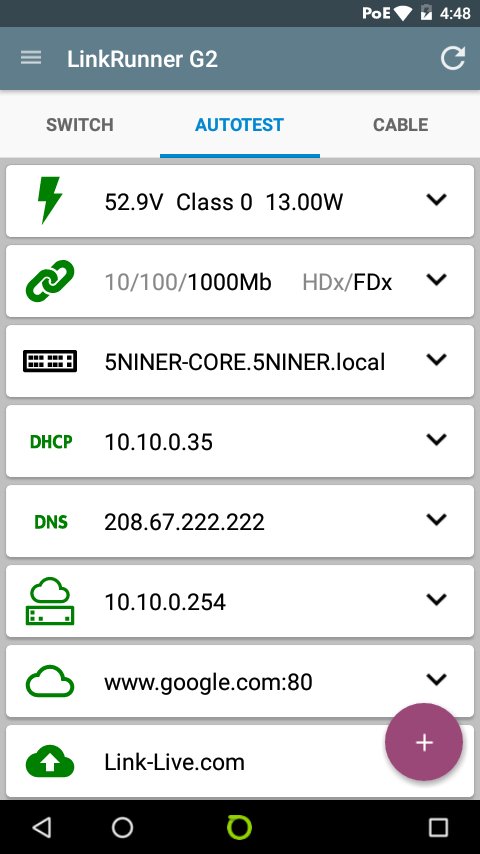
    AUTOTEST gathers POE information, switchport speed and duplex, CDP/LLDP information, DHCP, DNS, gateway, internet, and connection to the Link Live website.  Each test performed can be expanded to display more details of each test.

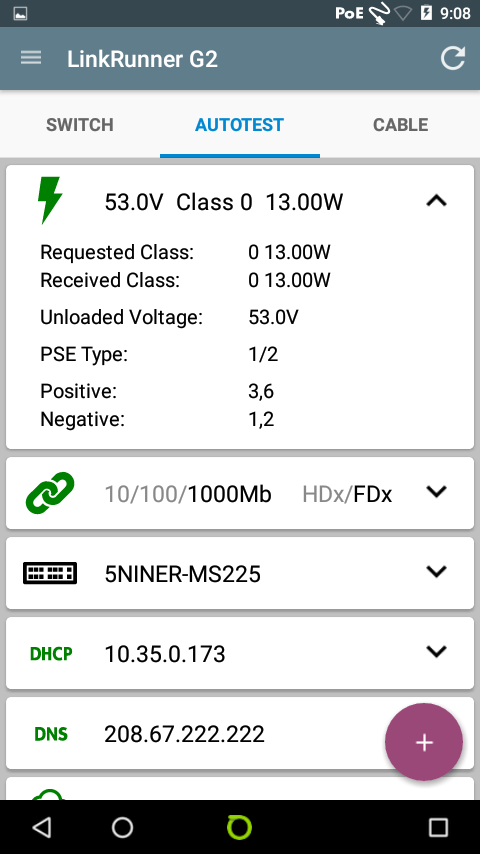
    Expanding the POE test reveals the voltage and wattage present and also the POE class.  In this example you will see that POE was available on the tested switchport with an available 53 volts and 13 watts.

    The next part of AUTOTEST is port speed and duplex.  This test will let you know whether the port you are connected to is 10/100/1000 Mbps and also whether the port is operating in a half or full duplex state.

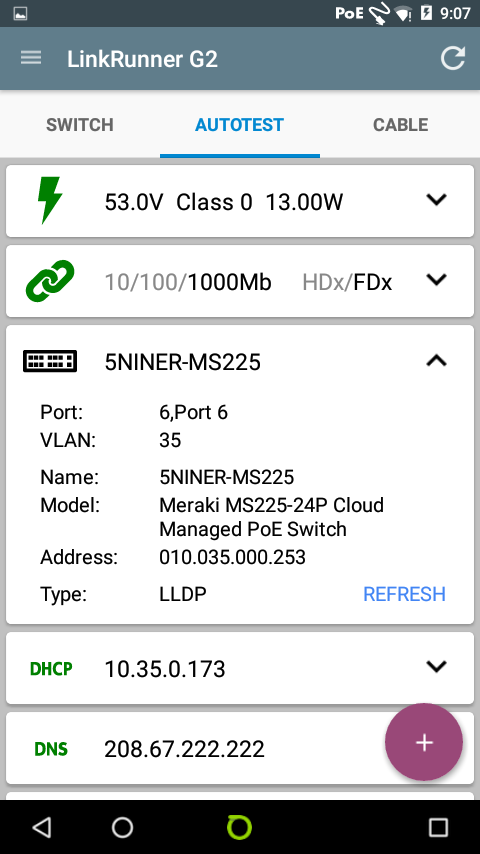
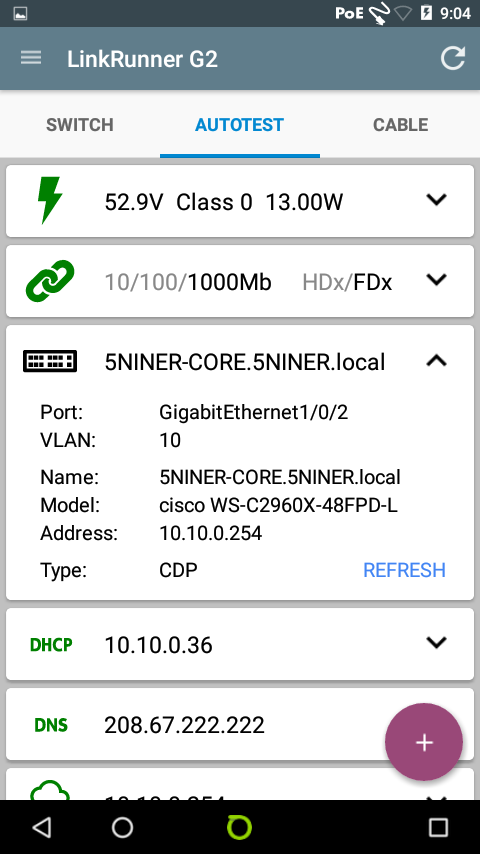
    My favorite test in AUTOTEST is the CDP/LLDP test.  This test reveals a lot of detailed information pertaining to the switch that you are connected to.


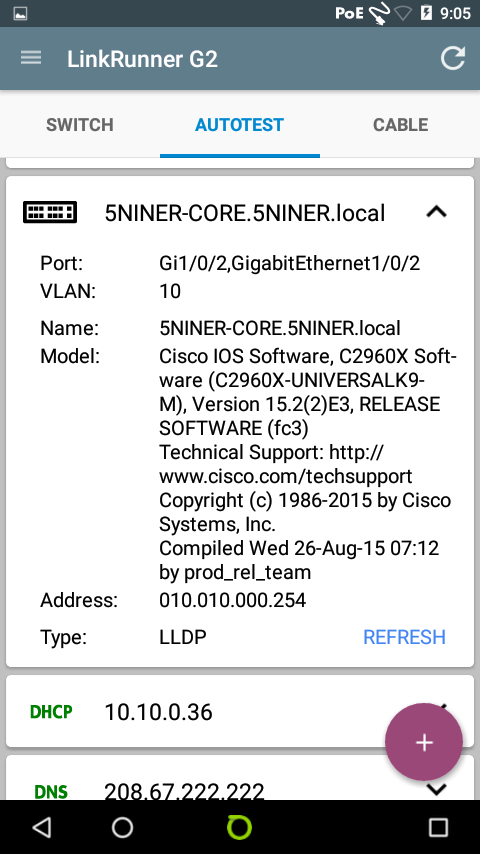
    The first image shows the LLDP information collected from a Meraki MS225.  The switch’s hostname, vlan membership, and switchport information is displayed.  The second image is CDP information from a Cisco 2960X.  The information that is given is very similar to that of the LLDP information from the Meraki.  The third image is the same Cisco 2960X but this time displaying the LLDP information.  You will notice in each example there is a “REFRESH” button that can be tapped.  In the case of the Cisco 2960X tapping “REFRESH” toggles between CDP and LLDP.  You will also notice in the LLDP information for the 2960X the IOS software version in addition to the hostname, switchport, vlan, and IP address.  As you can see, this can be extremely helpful while troubleshooting, all without even being near the switch.

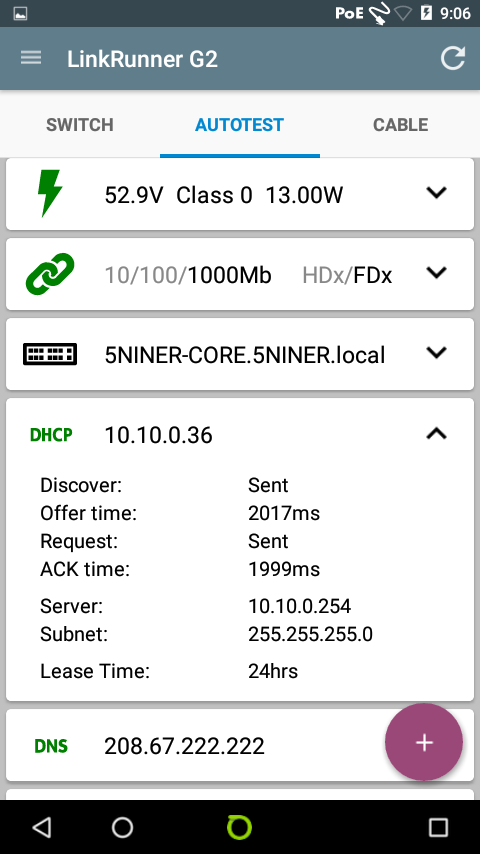
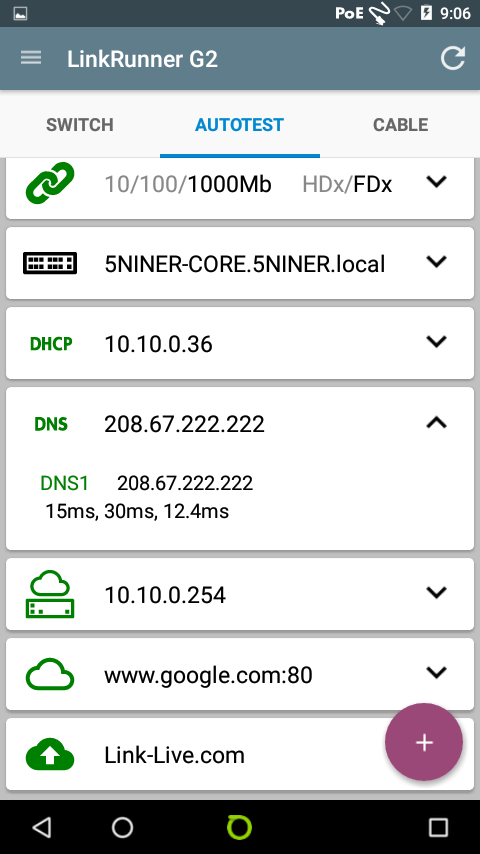
    The next two images show DHCP and DNS information that is gathered.  This test shows the DHCP offer time and ACK time as well as the DHCP server IP address and lease time.  The DNS test shows the primary DNS server and lookup times.  This information is obtained very quickly and eliminates the potential need to get other responsible parties involved for DHCP and or DNS details.


    The last three pieces of information under AUTOTEST are gateway, internet connection, and Link Live accessibility.   Under the gateway section local gateway information is given as well as the public IP address information and response times.  The internet connection test, shown here as “www.google.com:80,” shows the IP address that it has resolved for the name as well as response times.  Finally the last test shows that the information has been successfully uploaded to Link-Live.com.

    AUTOTEST is a very detailed tool that quickly gets essential network connection information to the network engineer in very short order.  The LinkRunner G2 brings all of the test results together into an easy to read screen.  Annotations and pictures (remember this thing has a camera!) can also be included with these tests by simply tapping the purple circle with the plus sign, which can also be uploaded to Link Live.  The AUTOTEST process takes roughly 10 seconds to complete which is a great advantage because traditionally all of this information would require several different tools and resources to get the job done.

    Have I mentioned the LRG2 is CHARGING via POE all while these tests are being performed?